

A green build proves that the checks you wrote passed. It does not prove that this is the right moment to change production.
A useful deployment gate gives the reviewer enough evidence to make a decision, blocks the runner for a bounded time, deploys only after an explicit approval, and records what happened after the decision. Anything less is a notification with an Approve button.
This guide builds that complete loop with GitHub Actions and the Actionbox API. It is a GitHub Actions manual approval pattern for teams that need a review outside the repository, while GitHub Environments remain useful for repository-native deployment protection. The workflow is intentionally explicit: there is no hidden polling service and no implicit success path.
Does GitHub Actions already have a manual approval step?
Yes. GitHub Environments can require reviewers before a deployment job starts. If a repository's own reviewers and deployment history meet your needs, start there. Check the feature's availability for your GitHub plan and repository visibility.
The Actionbox path in this guide is useful when the same team reviews changes from GitHub and other systems, or when the request needs a shared inbox with the exact release context and a separate execution result. Your workflow still owns the deployment. You can keep GitHub's environment protection alongside the Actionbox request.
The finished control loop
The decision and the execution result are separate records. An approval means “you may attempt this deployment”; the outcome says whether the attempt actually succeeded.
What the reviewer sees
The Action carries the environment, commit, workflow, release evidence, and a direct link back to the GitHub Actions run. The reviewer does not have to reconstruct the request from a generic notification.
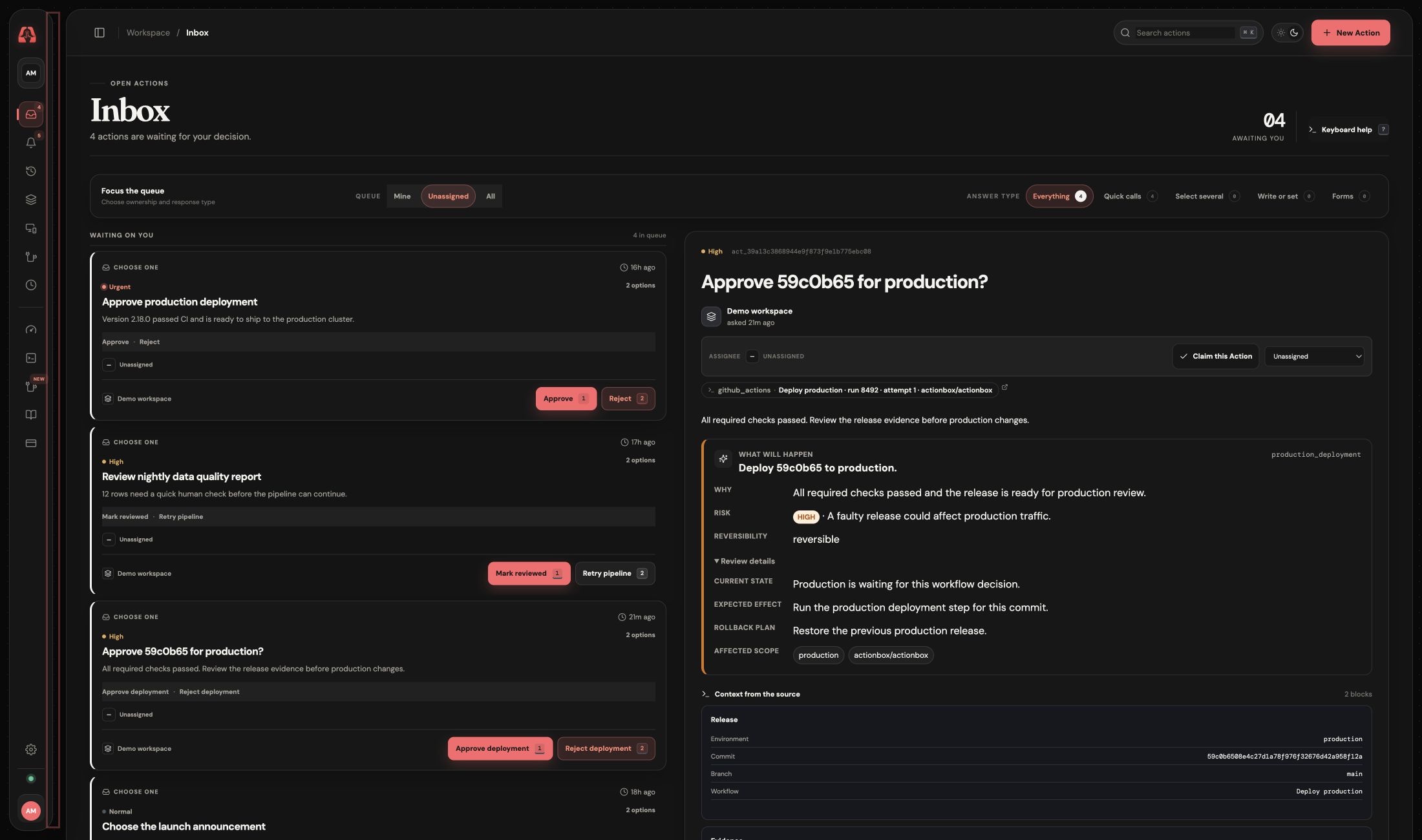
The screenshot above was captured from the local Actionbox reviewer UI using the exact workflow payload below. The same payload and lifecycle were also verified against the deployed Actionbox API. The GitHub origin is stored with the Action, not added later as presentation-only text.
Before the workflow
Create a dedicated Source for the repository or deployment system and save its token as the repository secret ACTIONBOX_TOKEN. Keep the token out of workflow arguments and checked-in files.
The runner only needs curl and jq, both present on GitHub-hosted Ubuntu runners. The workflow grants only contents: read; add other permissions only if your build or deployment genuinely needs them.
A complete fail-closed workflow
The following workflow creates one idempotent approval per GitHub run attempt, waits for at most 30 minutes, cancels an orphaned Action when the step is interrupted, and deploys only when the stable option ID is approve.
name: deploy-production

on:
  workflow_dispatch:

permissions:
  contents: read

jobs:
  deploy:
    runs-on: ubuntu-latest
    env:
      ACTIONBOX_API_URL: https://api.actionbox.cloud

    steps:
      - name: Check out the release
        uses: actions/checkout@11bd71901bbe5b1630ceea73d27597364c9af683 # v4.2.2

      - name: Test and build
        run: |
          npm ci
          npm test
          npm run build

      - name: Request production approval
        id: approval
        timeout-minutes: 35
        env:
          ACTIONBOX_TOKEN: ${{ secrets.ACTIONBOX_TOKEN }}
        shell: bash
        run: |
          set -euo pipefail

          action_id=""
          gate_complete=false

          cleanup() {
            if [[ -n "$action_id" && "$gate_complete" != true ]]; then
              curl --fail --silent --show-error \
                --request POST \
                "$ACTIONBOX_API_URL/v1/actions/$action_id/cancel" \
                --header "Authorization: Bearer $ACTIONBOX_TOKEN" \
                --header "Content-Type: application/json" \
                --data '{"reason":"GitHub Actions stopped waiting"}' \
                >/dev/null || true
            fi
          }
          trap cleanup EXIT INT TERM

          payload=$(jq -n \
            --arg sha "$GITHUB_SHA" \
            --arg workflow "$GITHUB_WORKFLOW" \
            --arg repo "$GITHUB_REPOSITORY" \
            --arg ref "$GITHUB_REF_NAME" \
            --arg run_id "$GITHUB_RUN_ID" \
            --arg attempt "$GITHUB_RUN_ATTEMPT" \
            --arg server "$GITHUB_SERVER_URL" \
            '{
              title: ("Approve " + $sha[0:7] + " for production?"),
              description: "All required checks passed. Review the release evidence before production changes.",
              priority: "high",
              options: [
                {id: "approve", label: "Approve deployment", style: "primary"},
                {id: "reject", label: "Reject deployment", style: "destructive"}
              ],
              decision_class: "production_deployment",
              decision_context: {
                schema_version: 1,
                reason: "All required checks passed and the release is ready for production review.",
                current_state: "Production is waiting for this workflow decision.",
                proposed_change: ("Deploy " + $sha[0:7] + " to production."),
                expected_effect: "Run the production deployment step for this commit.",
                risk_level: "high",
                risk_summary: "A faulty release could affect production traffic.",
                reversibility: "reversible",
                rollback_plan: "Restore the previous production release.",
                affected_scope: ["production", $repo]
              },
              context: [
                {
                  type: "key_value",
                  title: "Release",
                  items: {
                    Environment: "production",
                    Commit: $sha,
                    Branch: $ref,
                    Workflow: $workflow
                  }
                },
                {
                  type: "links",
                  title: "Evidence",
                  items: [{
                    label: "Open GitHub Actions run",
                    url: ($server + "/" + $repo + "/actions/runs/" + $run_id)
                  }]
                }
              ],
              metadata: {
                origin: {
                  provider: "github_actions",
                  ref: ($workflow + " · run " + $run_id + " · attempt " + $attempt),
                  url: ($server + "/" + $repo + "/actions/runs/" + $run_id),
                  labels: [$repo, $ref, $sha[0:7]]
                }
              }
            }')

          created=$(curl --fail-with-body --silent --show-error --connect-timeout 10 --max-time 45 \
            --request POST "$ACTIONBOX_API_URL/v1/actions" \
            --header "Authorization: Bearer $ACTIONBOX_TOKEN" \
            --header "Content-Type: application/json" \
            --header "Idempotency-Key: github-$GITHUB_RUN_ID-$GITHUB_RUN_ATTEMPT" \
            --data "$payload")

          action_id=$(jq -er '.data.id' <<<"$created")
          created_version=$(jq -er '.data.action_version' <<<"$created")
          created_fingerprint=$(jq -er '.data.fingerprint' <<<"$created")
          echo "action-id=$action_id" >>"$GITHUB_OUTPUT"

          deadline=$(( $(date +%s) + 1800 ))
          while (( $(date +%s) < deadline )); do
            current=$(curl --fail-with-body --silent --show-error --max-time 45 \
              "$ACTIONBOX_API_URL/v1/source/actions/$action_id?wait_seconds=30" \
              --header "Authorization: Bearer $ACTIONBOX_TOKEN")

            status=$(jq -er '.data.status' <<<"$current")
            if [[ "$status" == "open" ]]; then
              continue
            fi
            if [[ "$status" != "resolved" ]]; then
              echo "Approval ended with status: $status" >&2
              exit 1
            fi

            decision=$(jq -er '.data.resolution_option_id' <<<"$current")
            resolved_by=$(jq -er '.data.resolved_by_type' <<<"$current")
            action_version=$(jq -er '.data.action_version' <<<"$current")
            fingerprint=$(jq -er '.data.fingerprint' <<<"$current")
            if [[ "$resolved_by" != user || "$action_version" != "$created_version" || "$fingerprint" != "$created_fingerprint" ]]; then
              echo "The reviewed request changed or was not resolved by a person" >&2
              exit 1
            fi
            if [[ "$decision" != approve && "$decision" != reject ]]; then
              echo "Unexpected approval response: $decision" >&2
              exit 1
            fi

            echo "decision=$decision" >>"$GITHUB_OUTPUT"
            echo "action-version=$action_version" >>"$GITHUB_OUTPUT"
            echo "fingerprint=$fingerprint" >>"$GITHUB_OUTPUT"
            gate_complete=true
            exit 0
          done

          echo "No decision arrived within 30 minutes" >&2
          exit 1

      - name: Deploy to production
        id: production
        if: steps.approval.outputs.decision == 'approve'
        run: ./scripts/deploy.sh

      - name: Record the deployment outcome
        if: always() && steps.approval.outputs.decision == 'approve'
        env:
          ACTIONBOX_TOKEN: ${{ secrets.ACTIONBOX_TOKEN }}
          DEPLOY_OUTCOME: ${{ steps.production.outcome }}
          ACTION_ID: ${{ steps.approval.outputs.action-id }}
          ACTION_VERSION: ${{ steps.approval.outputs.action-version }}
          FINGERPRINT: ${{ steps.approval.outputs.fingerprint }}
        shell: bash
        run: |
          set -euo pipefail
          outcome=failed
          reason=DEPLOY_STEP_FAILED
          if [[ "$DEPLOY_OUTCOME" == success ]]; then
            outcome=success
            reason=""
          fi

          jq -n \
            --arg status "$outcome" \
            --arg reason "$reason" \
            --argjson version "$ACTION_VERSION" \
            --arg fingerprint "$FINGERPRINT" \
            '{status:$status,action_version:$version,fingerprint:$fingerprint}
             | if $reason != "" then .reason_code=$reason else . end' \
          | curl --fail-with-body --silent --show-error \
              --request POST "$ACTIONBOX_API_URL/v1/actions/$ACTION_ID/outcome" \
              --header "Authorization: Bearer $ACTIONBOX_TOKEN" \
              --header "Content-Type: application/json" \
              --header "Idempotency-Key: outcome-$ACTION_ID" \
              --data @-

      - name: Fail a rejected deployment
        if: steps.approval.outputs.decision == 'reject'
        run: |
          echo "The production deployment was rejected."
          exit 1
Why each guard exists
Stable option IDs, human labels
The workflow branches on approve, not the display text “Approve deployment”. Reviewers can receive clearer labels later without silently changing automation behavior.
A human decision for the same release
The runner compares the resolved Action's version and fingerprint with the request it created, and checks that a user resolved it. A changed request or a source-initiated resolution cannot authorize this deployment.
Two time bounds
The shell loop stops after 30 minutes. GitHub’s timeout-minutes: 35 is a second boundary in case the runner or network behaves unexpectedly. Neither timeout can turn into an approval.
Cleanup for interrupted runs
If the workflow is cancelled while waiting, the trap attempts to cancel the still-open Action. That prevents a reviewer from approving a request whose runner no longer exists. The cleanup is best-effort because a force-stopped runner cannot guarantee final network calls.
Rejection is not an incident
A rejection is a valid human decision, not automatically a production incident. This workflow fails the deployment job so the release remains visibly blocked, but it does not page an on-call engineer. Page only when the rejected request reveals a real operational incident.
Outcome reporting closes the audit gap
The deploy step can fail after a valid approval. Reporting success or failed binds the execution result to the exact Action version and fingerprint the reviewer saw. That preserves the distinction between decision made and change completed.
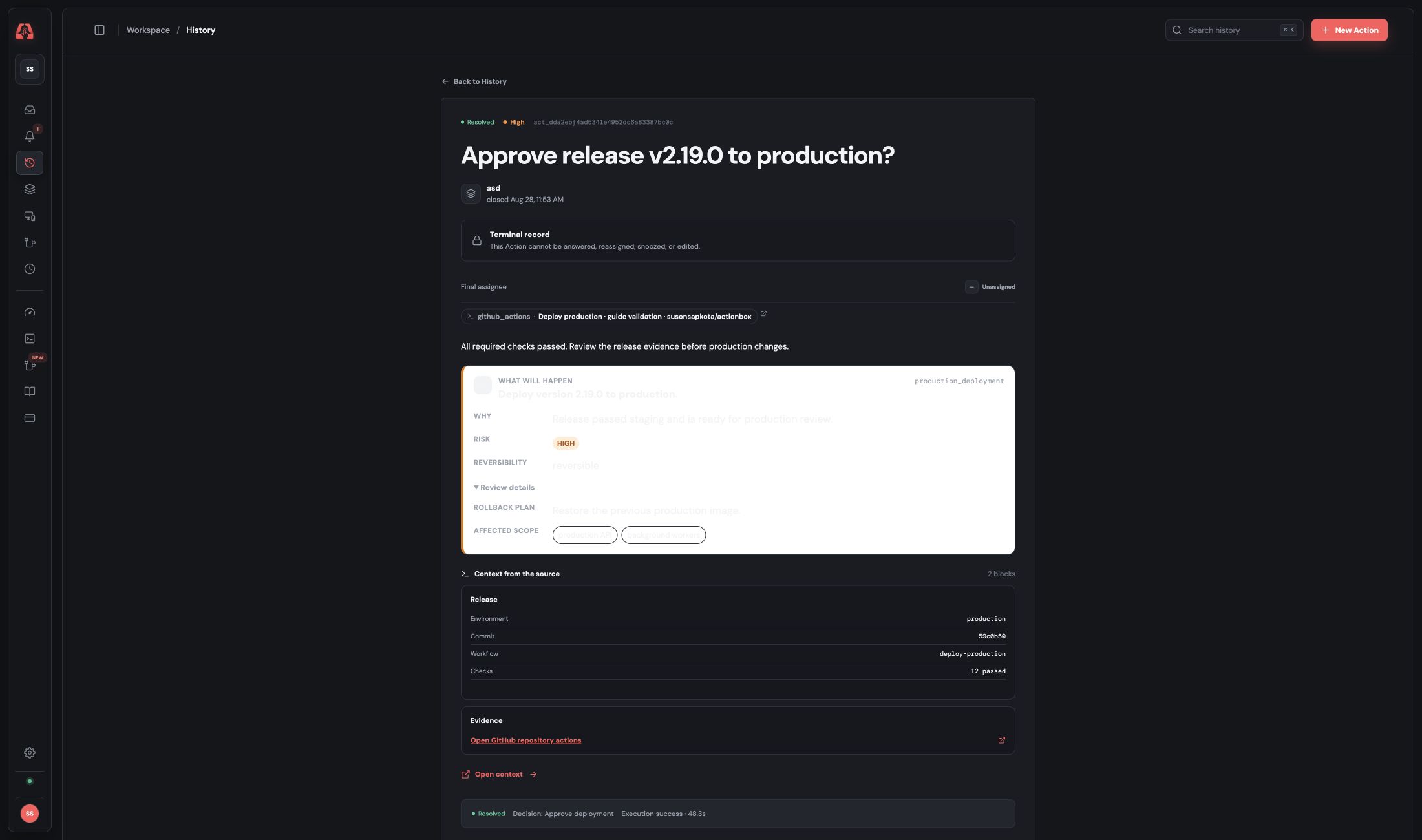
The resolved record keeps the original review context, the approve decision, the successful execution outcome, and the event history together.
Failure behavior at a glance
| Situation | Deployment runs? | Workflow result | Actionbox record |
|---|---|---|---|
| Reviewer approves | Yes | Deploy result | Decision plus execution outcome |
| Reviewer rejects | No | Failed | Resolved as reject |
| No answer in 30 minutes | No | Failed | Cancellation attempted |
| API or network error | No | Failed | No implicit approval |
| Workflow cancelled while waiting | No | Cancelled | Cancellation attempted |
| Deploy fails after approval | Attempted | Failed | Outcome reported as failed |
Actionbox and GitHub Environments are complementary
GitHub Environments can restrict branches, protect environment secrets, and require reviewers before a deployment job proceeds. Keep those controls when they are part of your security model.
Actionbox adds a shared decision inbox, typed context, cross-system provenance, and an execution outcome that can follow the same approval primitive outside GitHub. A conservative production setup can use both: GitHub Environments as the repository boundary and Actionbox as the operational decision record.
That distinction matters when evaluating a GitHub Actions deployment approval design: GitHub owns the workflow and environment boundary; Actionbox records the cross-system human decision and the result reported by the deployment worker. Neither should silently replace the other.
Validation notes
For this article, the workflow payload and lifecycle were verified against the deployed Actionbox API, resolved through the normal decision surface, and followed by a successful execution outcome bound to the resolved Action. The reviewer screenshot was captured from the local web build using that same payload so the documented UI and code stay in sync. The YAML was parsed independently, the exact shell path was exercised against the API, and the workflow was reviewed for rejection, timeout, interruption, network failure, and post-approval deployment failure.
References
- GitHub Actions workflow syntax
- Security hardening for GitHub Actions
- GitHub deployment environments
- Actionbox API reference
Ready to add the gate to a real pipeline? Create a free Source and keep the Actionbox API reference beside the workflow during review.
For GitOps-managed applications, use the Argo CD production sync approval guide to review and deploy a specific revision.