
A Slack approval workflow gives an authorized person a specific request, records their response, and lets the originating software continue according to that response. For deployments, data changes, and recovery operations, the workflow also needs a deadline and a defined execution result.
Start with one operation. A request to deploy a reviewed build has different evidence requirements from a request to rerun an import that may already have written data. Use the same review system where appropriate, but make the question precise.
Define the approval before choosing the channel
Write down the proposed operation, affected scope, eligible reviewer, and expiry behavior. Include the evidence needed to assess the request: a build identifier, validation summary, change description, or checkpoint. Link to restricted details rather than copying sensitive logs into a broadly visible channel.
Decide what the runner should do after rejection, expiry, and a lost connection. A timeout should follow your documented policy, not silently become approval. Keep the decision separate from the result of executing it.
Set up ActionBox Slack review
ActionBox Slack is available through assisted installation for Team workspaces and is not listed in the Slack Marketplace. Arrange access before inviting reviewers. An owner or administrator connects the workspace; each reviewer then links their own account. Follow the current setup guide for installation and permissions.
After setup, start with a harmless request. Open it in Slack, inspect the detail view, submit a response, and check the recorded result. A connected workspace alone does not establish that every user can review every Action.
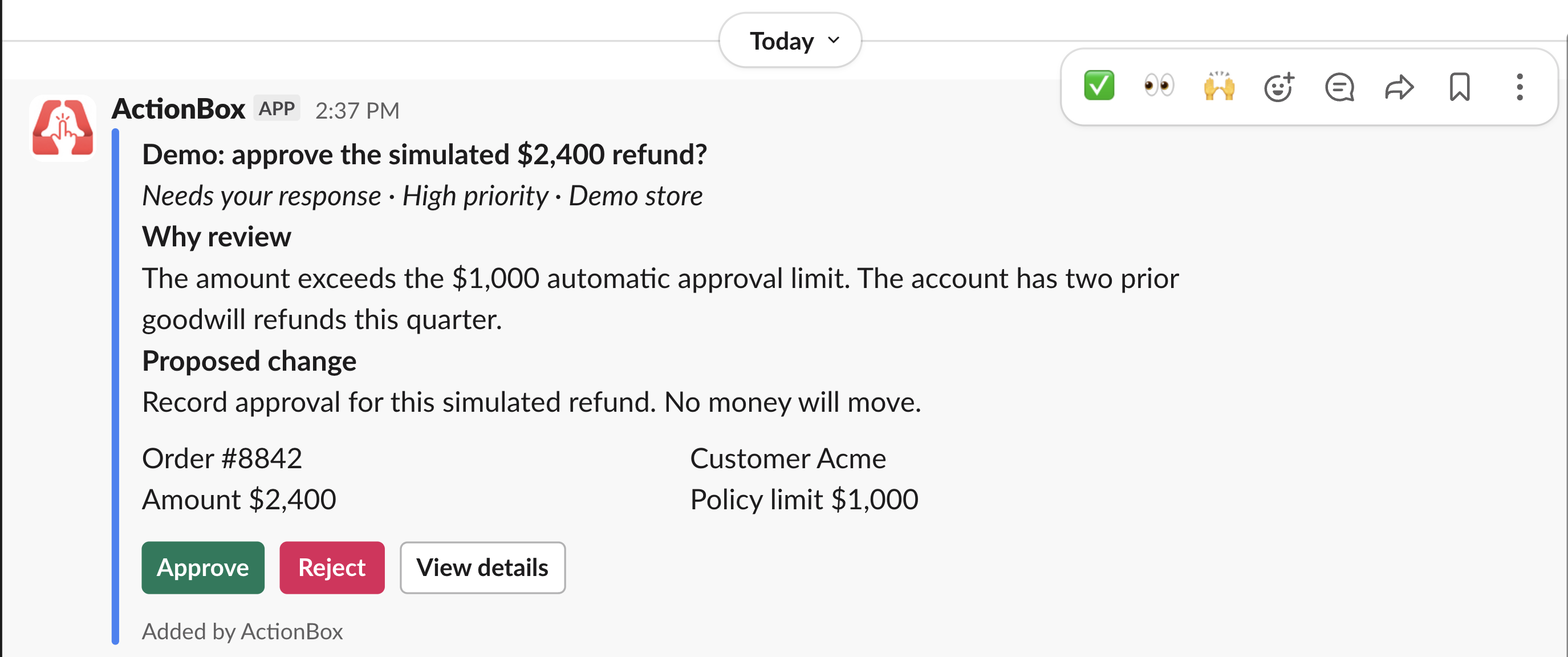
The existing product image shows a simulated refund request. Its amounts and customer label are demonstration data; it does not show a real refund or establish that a payment was executed.
Review the request with the right access
Choose the people who may answer the Action separately from the channel where a summary appears. Channel membership is not a substitute for Action permissions. For a sensitive operation, consider whether any channel summary is appropriate at all.
The hosted beta accepts the first valid decision. Other authorized reviewers can inspect the request, but an older response cannot overwrite its recorded answer. Do not describe this as a multi-person quorum workflow: creating all-reviewer or quorum policies is not currently available in the hosted beta.
When a response type cannot be represented accurately in Slack, the reviewer can continue in the web app. Keep that path available rather than reducing a structured question to an ambiguous emoji reaction.
Follow the operation after approval
Approval establishes permission to perform the named operation. The customer's runner remains responsible for performing it. If deployment fails afterward, retain that failure alongside the decision rather than changing the recorded answer to suggest that approval never happened.
Secondary recovery operations can use Action Controls when enabled for the workspace and plan. A control requests an operation declared by the Source. It does not close the Action, and an accepted control request is not proof of a successful repair.
For a CI implementation, start with the GitHub Actions approval integration. If you only need to report a failed build, the incoming-webhook notification example is a smaller starting point.
Keep discussion and notification preferences understandable
Use ActionBox's comment operation when a note belongs in Action history. Text typed directly into a Slack thread stays in Slack. A later reader should be able to tell which discussion was recorded with the Action and which remained in the chat channel.
Review notification settings with the team. Assignment, reminders, quiet hours, and snoozing answer different needs. Snoozing an Action affects its reviewers and does not extend its deadline. Confirm these behaviors in a test request so nobody relies on an assumption during an urgent review.
Test before using the workflow for consequential changes
Use synthetic data and an operation with no external side effect. Ask one eligible reviewer to respond, then verify that a stale response cannot replace the answer. Test an unauthorized reviewer, rejection, expiry, and a runner failure after approval.
Record expected and observed behavior. If you publish the exercise, explain what was simulated and avoid inferring faster incident resolution from a screenshot. A useful next step is measuring the time from request creation to decision and from execution start to verified outcome across real, comparable runs.
Explore ActionBox for Slack for supported workflows and beta access, or read the actionable alerts guide to design the full alert-to-outcome process.
Create a free Source, then confirm Team beta access before connecting Slack.