

A support team can use automation to draft a reply to a customer. Before that reply goes out, someone should check that it answers the question and makes no promise the team cannot keep. Human-in-the-loop automation puts that review inside the workflow: software prepares the work, waits for a person, and continues only according to their answer.
The difficult part is the wait. The reviewer may be away, the worker may restart, or the draft may change before anyone answers. A useful design accounts for those events before connecting the workflow to a system that sends a message, publishes content, or changes access.
This guide covers the workflow design. For AI agent tool boundaries, read the human-in-the-loop AI agents guide. For implementation code, use the n8n human-in-the-loop tutorial or LangGraph interrupt tutorial.
What human-in-the-loop automation means
A human-in-the-loop workflow includes a point where a person's input affects the result. That input could be approval, a correction, a choice between options, or missing information. It can be part of a conventional rules-based workflow or an AI system.
For an approval workflow, the protected operation waits until the person authorizes it. Sending a notification after the operation has finished is a different kind of oversight.
Consider these illustrative uses:
| Workflow | Software prepares | Person decides | Software continues with |
|---|---|---|---|
| Refund exception | Invoice, amount, and reason | Whether to issue the proposed refund | The approved payment request |
| Content publishing | Draft and destination | Whether the exact draft is ready | Publishing that version |
| Access request | Resource, scope, and duration | Whether the proposed access is appropriate | Granting the approved scope |
| Deployment | Release identifier and checks | Whether to release that version | The deployment job |
These are design examples, not customer results or evidence that approval alone makes a workflow safe.
Choose which requests need a person
Start with a decision rule that an operator can explain. For customer replies, that might be a draft containing a commitment about timing or money. For publishing, it might be the first public release of a document. The rule should identify a reason for review that the request can show to the person answering.
Avoid routing every routine step to the same reviewer. A queue full of low-value requests consumes the time needed for difficult ones. Equally, a model's confidence score alone does not tell you the impact of a mistake. A confident request can still target the wrong account.
Write down the allowed automatic path, the review path, and the conditions that require stopping work. Choose thresholds from your own operating policy. A dollar amount copied from an example says nothing about your customers or risk tolerance.
Write the request before building the workflow
The reviewer needs to understand what will change and why their answer is needed. "Approve task 8472?" makes them investigate. "Send the proposed reply for support ticket 8472?" gives them a decision, provided the exact draft and recipient are visible.
Use this worksheet to define one review step. It is a planning template, not an API payload:
Operation to review:
Exact record, version, or destination:
Proposed change:
Reason this request needs a person:
Evidence the reviewer can inspect:
Who is allowed to answer:
Deadline and reason for it:
What rejection does:
What happens if nobody answers:
What changes would require a new review:
How execution success or failure will be recorded:
Include enough context to judge the operation without copying credentials or entire customer records into the request. If a person needs information that you cannot safely include, provide an appropriate authenticated path to inspect it.
Human approval workflow example: review a customer reply
Here is the complete decision path for a draft reply. The draft is fictional, and the screenshot is from an actual n8n test workflow. Its Approved reply (demo only) node is a no-op; it does not send an email.
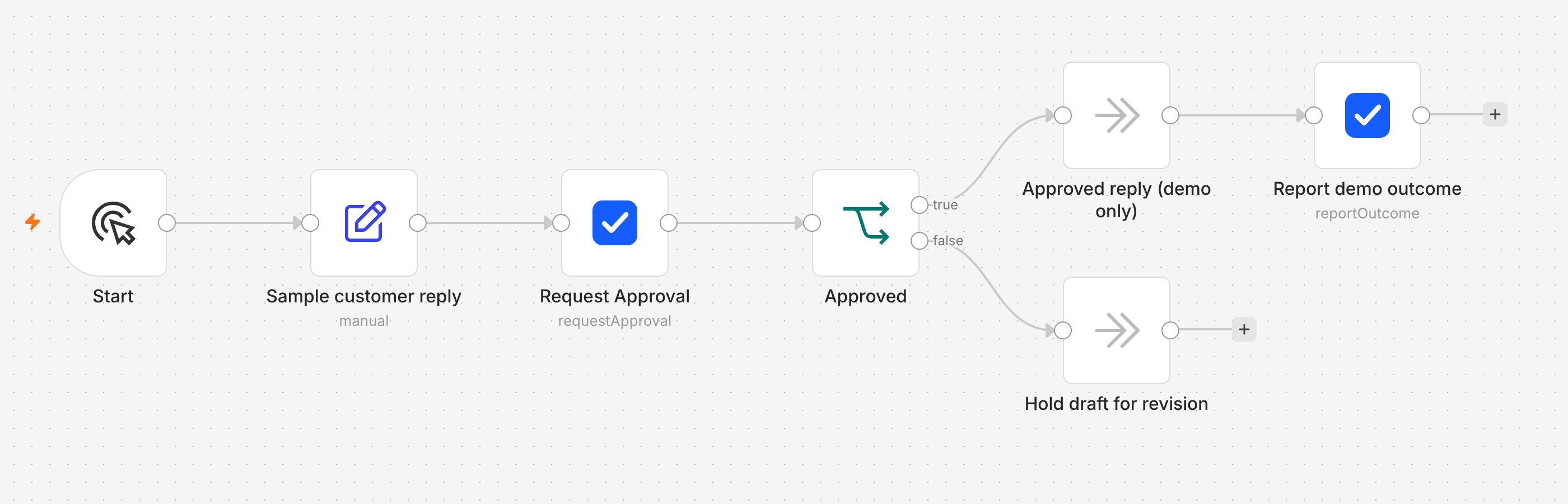
Open the 2,800-pixel workflow screenshot at full size.
- Prepare the draft. Save the customer request ID, the exact draft text or version, and the recipient in the system that owns the workflow. The example starts with a sample draft entered in n8n.
- Ask for a decision. Show the reviewer what will be sent and why review is needed. The ActionBox request holds the decision; the workflow retains the draft and its identifier.
- Wait and branch. Continue to the protected send step only when the returned decision is an explicit, verified approval for that draft. Rejection, expiry, cancellation, and timeout all stop the send. In the screenshot, the approved path runs a harmless demo node; the other path holds the draft for revision.
- Check again before sending. If the recipient or draft has changed during the wait, create a new request. After a valid approval, use the email provider's idempotency or reconciliation controls so a retry cannot send the same reply twice.
- Record what happened. Approval means the message may be sent; it does not mean delivery succeeded. Record the send result separately, including failures.
The n8n human-in-the-loop walkthrough shows the node settings and the comparison with n8n's built-in review. For a safe importable starter, download the approval workflow template. Replace its demo operation only after you have tested both branches.
Separate waiting from deciding and executing
Your workflow needs to remember the proposed operation while the person considers it. The approval record and the execution record have different jobs: one records permission, and the other records what the software actually did.
| Stage | What the workflow must retain |
|---|---|
| Prepared | Exact proposed operation and business request identifier |
| Waiting | Approval identifier, reviewed version, and deadline |
| Approved | Verified answer linked to the same proposal |
| Rejected or expired | Reason to stop the protected operation |
| Executing | Downstream request identity and execution state |
| Finished or failed | Actual result and any recovery work |
Store this information in the system responsible for running the workflow. An approval service does not automatically preserve a worker's local variables or reconstruct a lost execution.
In ActionBox, the hosted service stores the human request and decision. Your integration owns the job and performs the approved operation. The integration architecture explains that boundary.
Decide what happens when nobody answers
A deadline should reflect how long the proposal remains useful. A deployment window can close. A customer can cancel their request. Leaving an approval open indefinitely may produce an answer to a question that no longer applies.
For an operation that requires explicit permission, reaching the deadline should stop execution. Assign responsibility for checking the unresolved business request separately. Expiration is not proof that someone handled the underlying problem.
ActionBox supports an expiration time on a request. Follow the expiration and timeout documentation when configuring it. Your workflow must still handle network failures and local timeouts without treating them as approval.
If a reviewer asks for a change, compare the revised proposal with what they originally saw. A different amount, destination, or document version may require a new decision. Do not apply permission for one operation to another.
Make retries safe on both sides of approval
Suppose the workflow creates a request but loses the HTTP response. Retrying should recover that logical request instead of asking a second person the same question. ActionBox supports idempotency for this purpose; keep the request identity and payload stable when retrying, and respect the documented retention window. Persist the returned Action ID so recovery can read the existing request. See idempotency and dedupe.
There is a separate retry problem after approval. An email provider might accept a send before your worker loses its connection. Retrying blindly can send the same reply twice even though the human approved only once. Use the downstream system's idempotency mechanism when available, or reconcile its result before retrying.
If you receive decisions through ActionBox callbacks, verify the signature and deduplicate deliveries. Delivery is at least once. A callback that arrives twice must not cause the protected operation to run twice. The callback documentation describes verification and the decision binding to check before continuing.
Choose an implementation that fits the existing workflow
Start with the system that already owns the work. A native review step may be enough when it reaches the right people and retains the decision where you need it.
If you're deciding whether each sensitive operation must wait for approval or a person can supervise bounded automation, the HITL versus HOTL comparison helps define that boundary before you choose a tool.
For example, n8n documents Gmail approval messages and human review for AI tool calls. LangGraph provides interrupts and checkpoint-based resume for graphs. These solve different parts of the problem.
An external approval service is useful when several workflows need a shared place for people to answer. ActionBox supplies that request and decision layer while your existing workflow continues to own execution. Use the n8n guide for an HTTP workflow, the LangGraph guide for graph interrupts, or the webhook integration guide for an application receiving callbacks.
Apply the pattern to operational exceptions
The same review boundary appears in several operational systems. The surrounding records and response choices change, but the integration still needs to preserve the proposal, wait for an authorized answer, reject stale decisions, and apply the result once.
- A material review board process moves a nonconformance from material hold to an explicit disposition.
- An inventory adjustment approval workflow reviews cycle count evidence before changing a stock balance.
- RPA exception handling retries recoverable bot failures and routes unresolved choices to an operator.
- EDI error handling keeps transport and syntax recovery automatic while escalating valid transactions that fail a business rule.
- A price override approval workflow binds a commercial decision to one quote version and price basis.
Each guide includes an API example, failure cases, and a high-resolution mobile review example using fictional data.
Test the paths that happen after the demo
Before connecting a real side effect, test rejection, no response, a changed proposal, a worker restart, and duplicate delivery. Also test approval followed by a downstream failure. A green approval screen should not hide a failed operation.
Measure how many requests need clarification, how long they wait, and how often they expire. If people repeatedly ask for the same missing field, improve the request. If requests expire because nobody owns the queue, change the assignment process before shortening the timer.
Start with one operation and a reviewer who can explain the decision. Create a free Source, then follow the ActionBox quickstart to connect the request to your workflow.
If you would like help choosing the first review step or setting up a test, email info@actionbox.cloud with a short description of the workflow.