
A webhook is the right fit when a worker must pause for a person without holding an HTTP connection open. The safe pattern is to persist the worker's state, create one durable Action, verify the signed callback, and resume the side effect exactly once.
If your workflow runs in n8n and bounded polling is easier than hosting a callback, use the n8n human-in-the-loop tutorial. This guide focuses on signed webhooks for application workers.
This guide follows a working Python example through that full path. Its signature checks, replay protection, event deduplication, rejection path, and unmatched-event behavior are covered by automated tests. We also ran the example against a local Actionbox API, made a real decision in the Actionbox inbox, received the callback, and reported the outcome.
The verified callback path
There are two important boundaries here:
- The callback authenticates the event, but Actionbox remains the source of truth for the current Action state.
- The callback can be delivered more than once, so both the event consumer and the downstream side effect need idempotency.
1. Persist the run before you wait
Create the Action with a stable idempotency key and save the returned Action ID beside your own run ID. This mapping is how a later callback finds the correct suspended workflow.
from actionbox import Actionbox, deployment_decision_context

with Actionbox(api_key, base_url=api_url) as client:
    action = client.create(
        title="Approve production deployment?",
        description="Release 2.19.0 passed staging and is ready for production.",
        priority="urgent",
        options=[
            {"id": "approve", "label": "Ship it", "style": "primary"},
            {"id": "reject", "label": "Hold", "style": "destructive"},
        ],
        context=[{
            "type": "key_value",
            "title": "Release evidence",
            "items": {
                "Environment": "production",
                "Commit": "abc123f",
                "Run": run_id,
                "Staging": "passed",
            },
        }],
        decision_class="production_deployment",
        decision_context=deployment_decision_context(
            reason="Release 2.19.0 passed the staging verification suite.",
            proposed_change="Deploy release 2.19.0 to production.",
            risk_level="high",
            reversibility="reversible",
            rollback_plan="Restore release 2.18.0 from the previous image.",
            affected_scope=["production API", "background workers"],
        ),
        callback_url=callback_url,
        idempotency_key=f"{run_id}:approval",
    )

store.register(run_id=run_id, action_id=action.id)
The worker can now exit or release its compute while the row remains in a waiting state.
2. Give the reviewer operational context
The reviewer should not have to leave the decision surface to understand what will happen. Include the proposed change, evidence, affected scope, risk, reversibility, and rollback plan in the Action itself.
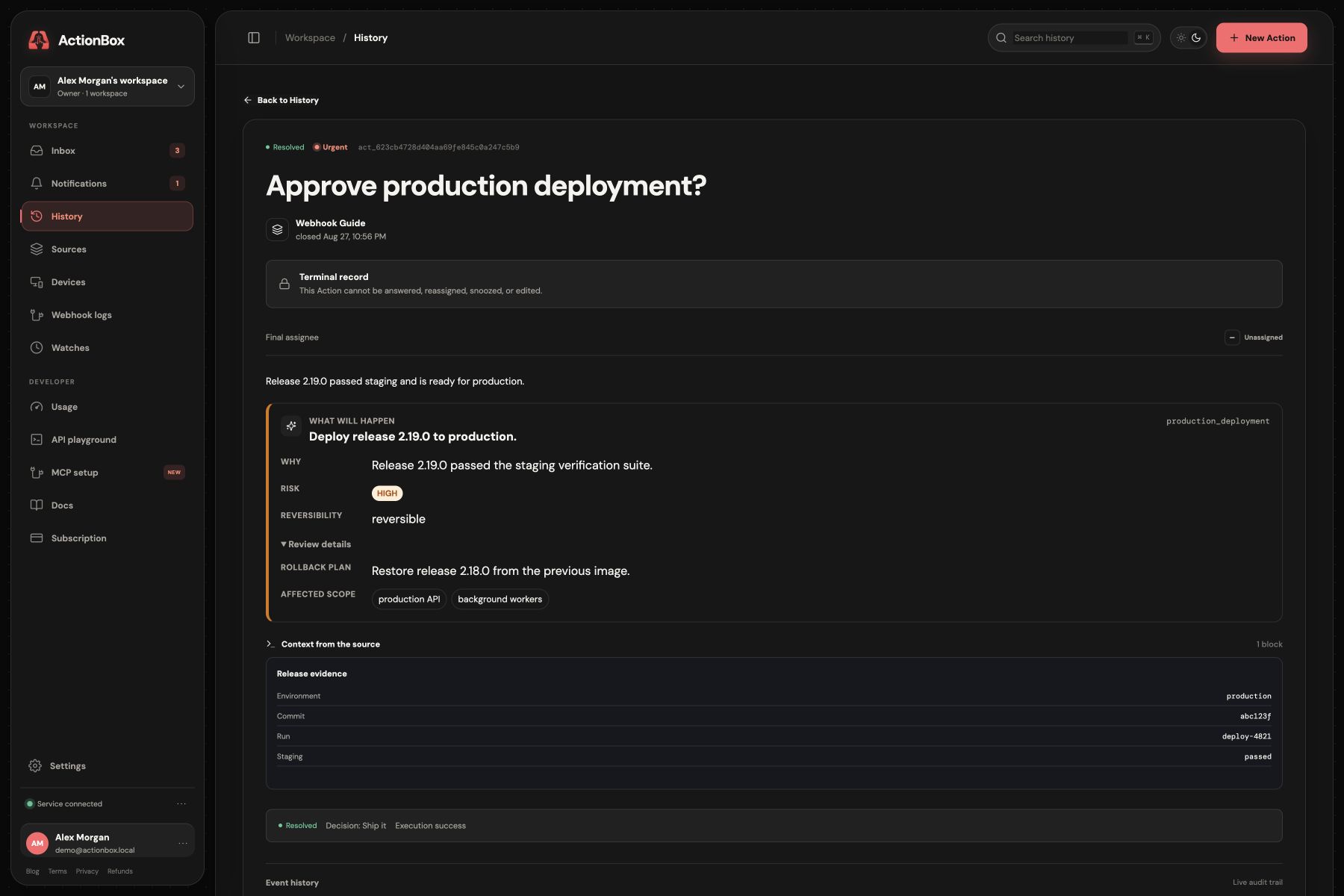
The labels are for people; the stable option IDs (approve and reject) are what your software consumes.
3. Verify the exact bytes before parsing JSON
Actionbox signs timestamp.raw_body with HMAC-SHA256. Verify the raw request body, use constant-time comparison, and reject stale timestamps before you trust or parse the event.
import hashlib
import hmac
import json
import time

def verify_actionbox_event(raw_body, *, timestamp, signature, secret):
    if not timestamp or not signature:
        raise ValueError("missing Actionbox signature headers")

    sent_at = int(timestamp)
    if abs(int(time.time()) - sent_at) > 300:
        raise ValueError("stale Actionbox callback")

    expected = "v1=" + hmac.new(
        secret.encode("utf-8"),
        timestamp.encode("ascii") + b"." + raw_body,
        hashlib.sha256,
    ).hexdigest()
    if not hmac.compare_digest(expected, signature):
        raise ValueError("invalid Actionbox signature")

    return json.loads(raw_body)
Read the signature values from X-Actionbox-Timestamp and X-Actionbox-Signature. Keep this verifier in one tested adapter rather than copying cryptographic code into every route.
4. Deduplicate and correlate with action_id
Do not expect your arbitrary Action metadata to be repeated in the webhook envelope. The signed payload supplies data.action_id; look up the corresponding run ID in the mapping you persisted at creation time.
MAX_CALLBACK_BODY_BYTES = 256 * 1024

async def read_bounded_body(request: Request) -> bytes:
    body = bytearray()
    async for chunk in request.stream():
        body.extend(chunk)
        if len(body) > MAX_CALLBACK_BODY_BYTES:
            raise HTTPException(status_code=413, detail="Webhook payload is too large")
    return bytes(body)

@app.post("/actionbox/webhook")
async def callback(request: Request, background_tasks: BackgroundTasks):
    raw_body = await read_bounded_body(request)
    event = verify_actionbox_event(
        raw_body,
        timestamp=request.headers.get("X-Actionbox-Timestamp"),
        signature=request.headers.get("X-Actionbox-Signature"),
        secret=webhook_secret,
    )

    result = store.accept(event)  # unique event ID + action_id lookup
    if result.state == "queued" and result.run_id and not result.duplicate:
        background_tasks.add_task(
            resume,
            result.run_id,
            result.action_id,
        )
    return {"ok": True, "duplicate": result.duplicate}
The durable store should enforce a unique constraint on the callback event ID and on the Action-to-run mapping. An unmatched but valid event should be recorded for investigation, not attached to a guessed workflow.
5. Reconcile, execute once, and report the outcome
Before changing production, re-fetch the Action and confirm that it is resolved with the decision you expect. Then invoke an idempotent deployment operation and report the result back to the same Action.
def process_approved_run(*, store, run_id, action_id, client, deploy):
    action = client.get(action_id)
    if action.status != "resolved" or action.decision != "approve":
        store.finish(run_id=run_id, succeeded=False)
        return

    try:
        deploy(run_id)  # the real deployment API must also be idempotent
    except Exception:
        action.report_outcome("failed", reason_code="deployment_failed")
        store.finish(run_id=run_id, succeeded=False)
        raise

    action.report_outcome("success")
    store.finish(run_id=run_id, succeeded=True)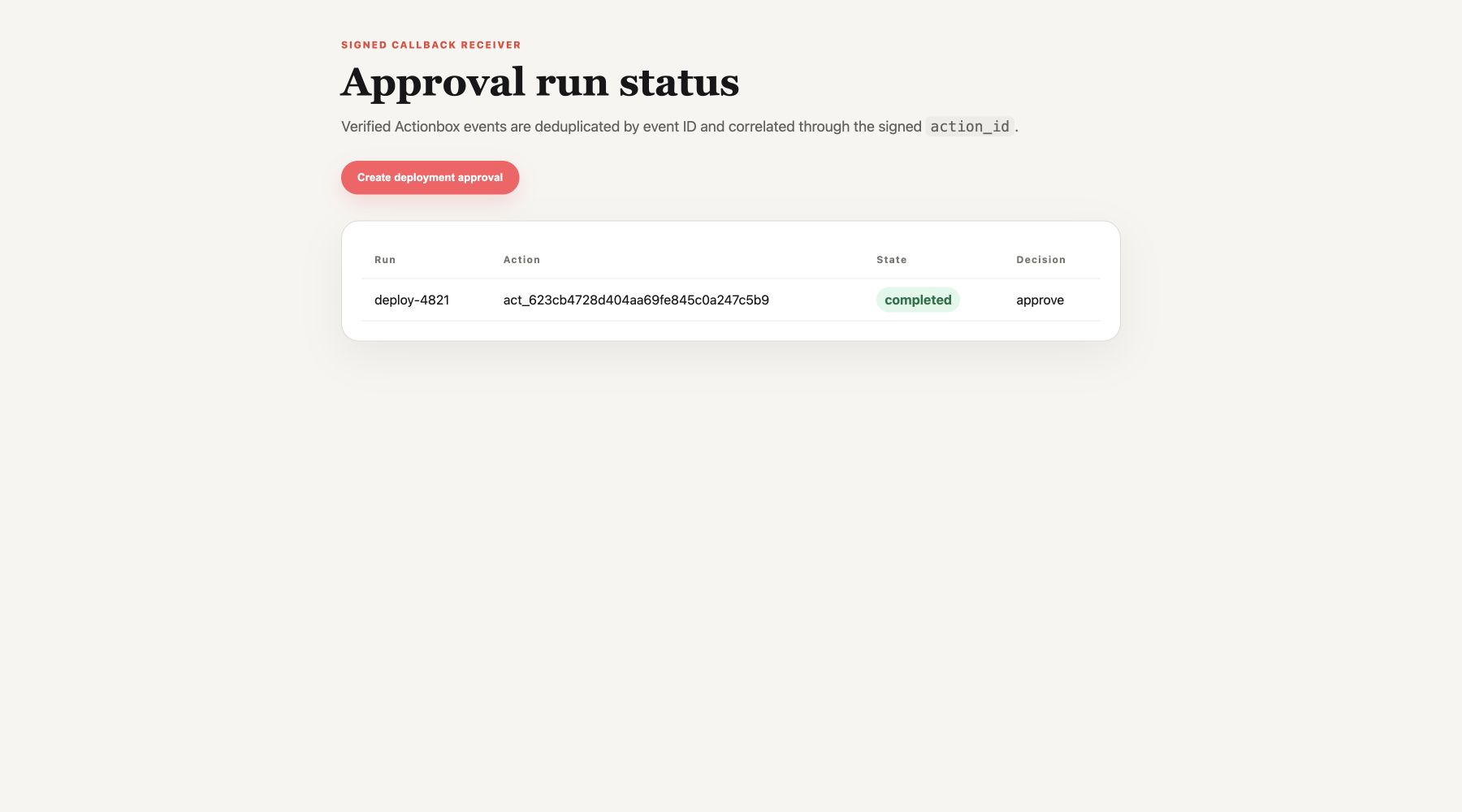
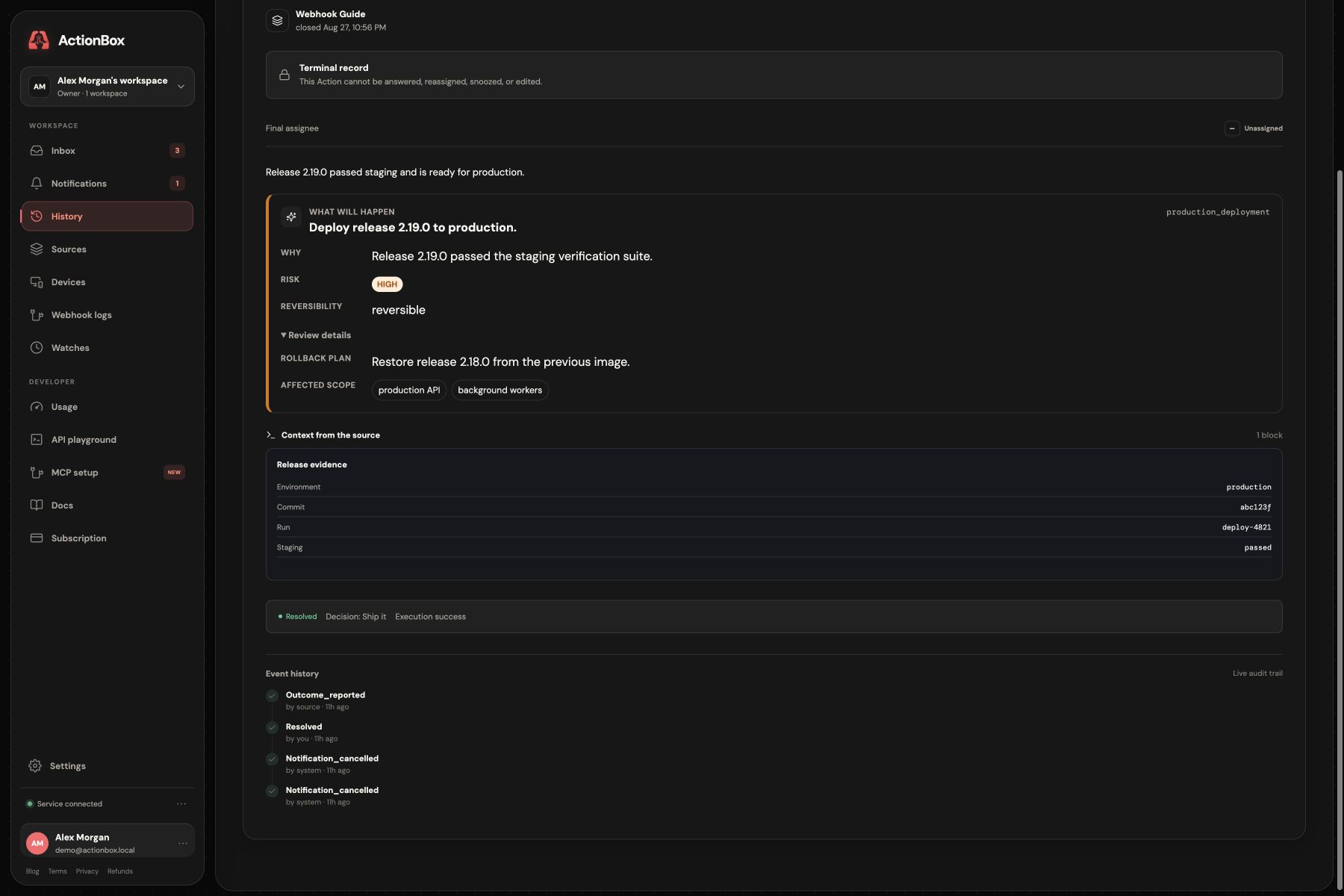
The Action history now joins the human decision and the reported machine outcome in one audit trail.
How this guide was validated
Before publication, we validated this implementation with automated coverage for:
- a valid HMAC signature over the raw body;
- rejection of a changed body and a stale timestamp;
- duplicate delivery of the same event ID;
- the reject path, which stops rather than queues the run; and
- a valid event whose Action ID has no local run mapping.
We then completed a real local Actionbox round trip: Action creation, human decision, signed callback delivery, duplicate-safe resume, and outcome reporting. The walkthrough uses a simulated deployment function so it cannot modify real infrastructure. In production, replace that function with an API that accepts its own idempotency key. Use a public HTTPS callback URL; loopback callbacks are only appropriate for an explicitly enabled non-production environment.
For worker restart and reconciliation patterns, continue with durable execution. For the broader control-plane design, read human-in-the-loop AI agent architecture and AI agent audit trails.
Create a free Source · Human approval API · Read the docs
Further reading
- Actionbox integration docs — callbacks, typed responses, and outcomes.
- Human approval API — create the first decision request.
- Human-in-the-loop API vs building your own — delivery and maintenance trade-offs.