
An n8n human-in-the-loop workflow pauses before a consequential operation and continues only after a person answers. You can do this with n8n's built-in review tools. The ActionBox community node is another option when the decision needs to be available beyond one n8n workflow. The direct API gives you more control over the request and recovery logic.
n8n's Gmail node documentation covers approval messages and human review for AI Agent tool calls. Its Wait node can also pause an ordinary workflow. Start there when the decision only matters inside n8n and the built-in delivery path suits your reviewers.
Use ActionBox when the decision needs to sit in the same shared inbox as requests from other systems, or when another application must be able to read the decision after an n8n execution ends.
| Your workflow needs | Start with |
|---|---|
| Approve an AI Agent tool call in a supported n8n channel | Native n8n review |
| Pause one ordinary n8n workflow and resume it from a form or authenticated webhook | n8n Wait node |
| Give reviewers one inbox for n8n and requests from other applications | ActionBox |
| Let another service read the decision later using a saved Action ID | ActionBox |
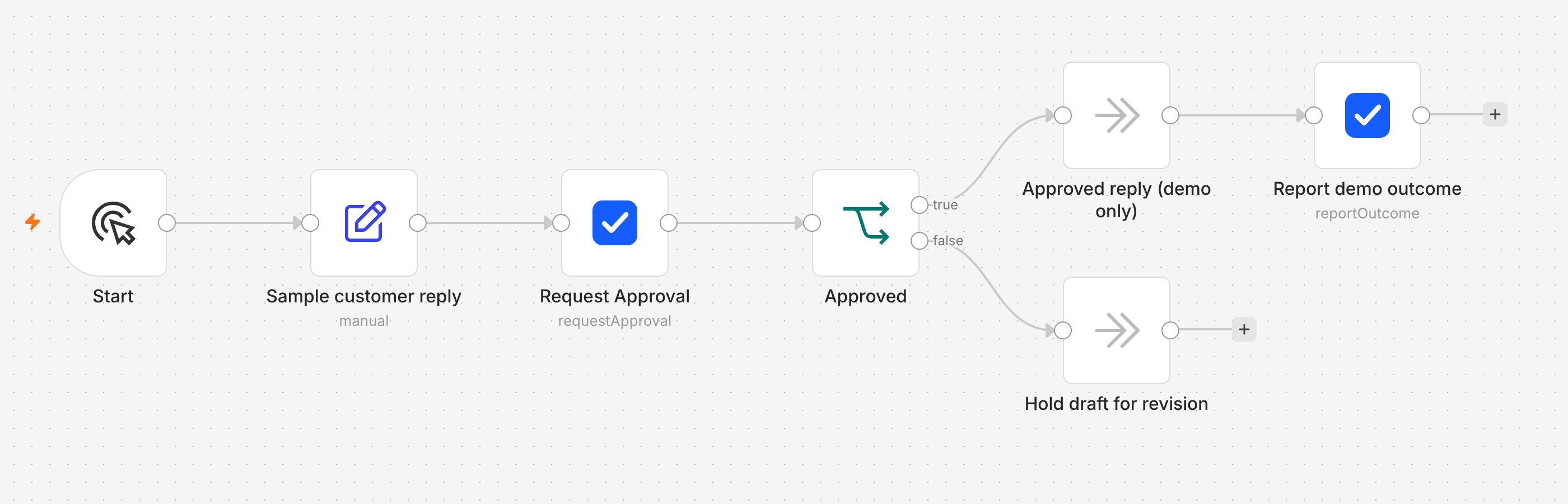
The workflow pictured above is a local demo. It prepares a sample customer reply, waits at Request Approval, then separates the approved path from Hold draft for revision. The approved path records a demo outcome; it does not send an email.
Run the importable workflow template with its harmless demo operation first. Once both branches work, try a representative case: a workflow drafts a reply about a delayed order. Put the recipient, subject, and full draft in the review request, but keep the demo operation while testing. Only after approval, rejection, and timeout behave as expected should you replace it with an email-sending node. The manual API example later in this guide uses a refund to show the additional checks needed before money moves.
ActionBox stores the review request and answer. n8n still owns the workflow and executes the approved operation. If the draft or recipient changes after approval, request a new decision for the changed version.
Fastest path: install the ActionBox community node
Install n8n-nodes-actionbox on an n8n instance you administer. In Settings → Community Nodes → Install, enter the package name, review n8n's notice, and add an ActionBox node to your workflow. The tested compatibility target is n8n 2.38.7. The connector has not been verified for n8n Cloud.
The Request Approval and Wait operation creates the request and pauses the execution. After the decision, branch only when actionbox.approved is true. Rejection, expiry, cancellation, timeout, a changed review snapshot, and an invalid response all return false.
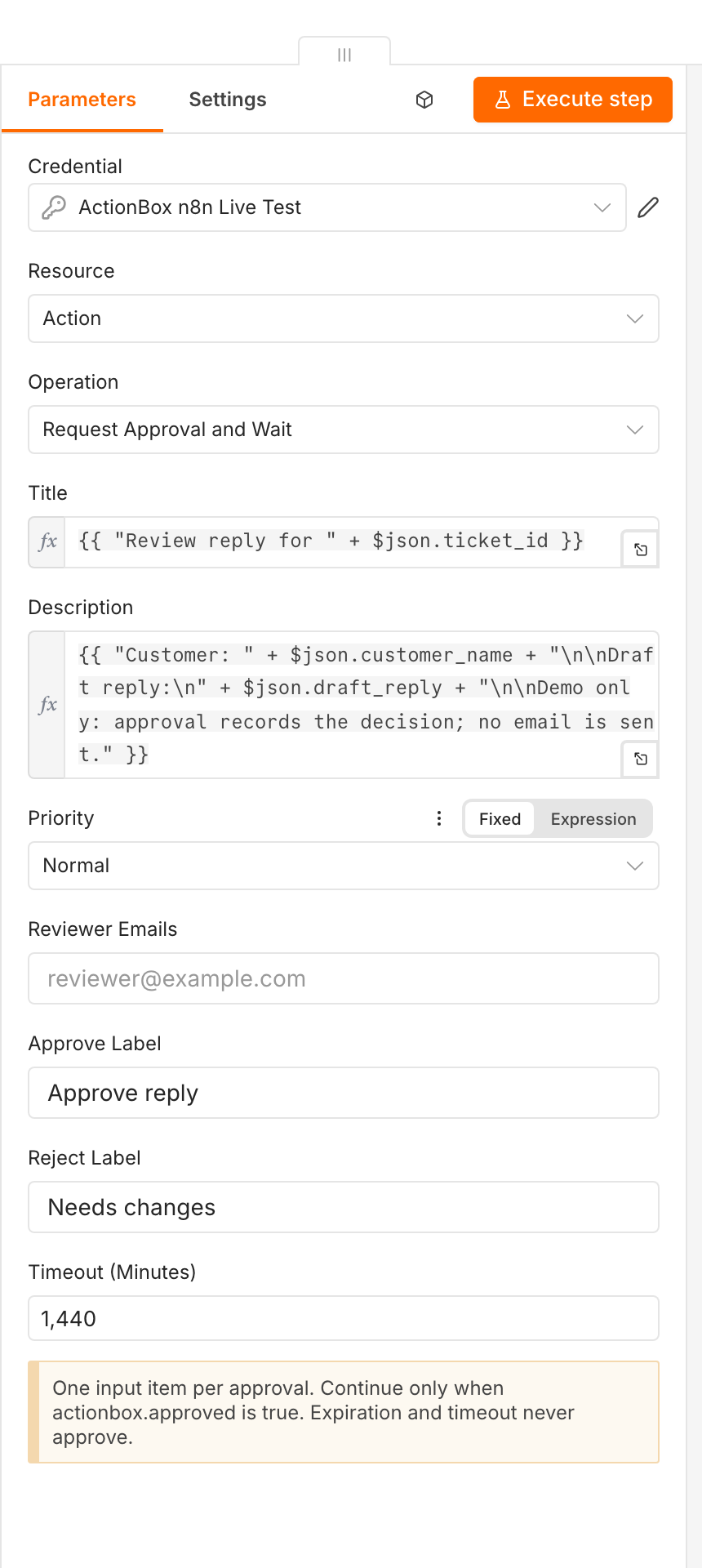
Use the importable n8n workflow template for the shortest setup. It includes a harmless demo operation and reports success after the approved branch runs. The complete credential, callback, and recovery contract is in the n8n integration guide.
Before a live test, give your n8n instance a reachable HTTPS callback address and keep its execution data for the duration of the wait. Create a dedicated ActionBox Source, then put its Source key and webhook signing secret in n8n credentials. The integration guide walks through these requirements and the credential test.
The rest of this article shows the direct HTTP integration. Keep it when you need custom request fields or already own the surrounding wait and recovery logic.
Build the first approval on the n8n canvas
The downloadable template has six nodes, so you can see the decision path before connecting another service. The pictured customer-reply demo has one extra input node and uses different names for the two exits; it follows the same approval branch:
- Start triggers a manual test.
- Request Approval creates the ActionBox request and waits for a reviewer.
- Approved checks
{{ $json.actionbox.approved }}. Onlytruegoes to the operation branch. - Demo Operation does nothing outside n8n. Report Success records that this demo branch completed.
- Not Approved is the separate exit for rejection, expiry, cancellation, timeout, or an invalid decision.
Run it once with Approve and once with Reject. Inspect the two executions before editing the demo node. The template walkthrough covers import, credentials, and the callback setup step by step.
The manual API workflow
This example puts a refund approval between an automated check and the refund API without relying on the community node:
The Actionbox Source key can create, read, cancel, and report outcomes for its own Actions. Keep it in an n8n credential. Do not paste it into a Code node, workflow export, URL, or expression.
1. Start with a stable input
The workflow needs an identifier that means "this exact refund request," even after a retry. A database row ID, payment ID, or job ID works. An n8n execution ID alone is weaker because a manual restart can produce a new execution for the same business operation.
Use an input shaped like this:
{
  "request_id": "refund_8472",
  "customer": "Acme Corp",
  "amount": "425.00 USD",
  "reason": "Duplicate invoice",
  "approval_expires_at": "2026-10-01T22:00:00Z"
}
Replace the sample deadline with a future time appropriate for your request. Persist that time with the original input; recomputing it during a retry changes the request payload.
Pass only the context a reviewer needs. Payment credentials, full customer records, access tokens, and hidden model prompts do not belong in an approval request.
2. Create the Action with an HTTP Request node
Configure an n8n HTTP Request node named Create approval:
| Setting | Value |
|---|---|
| Method | POST |
| URL | https://api.actionbox.cloud/v1/actions |
| Authentication | Header credential containing Authorization: Bearer <Source key> |
| Header | Idempotency-Key: n8n:refund:{{$json.request_id}} |
| Body content type | JSON |
Use this request body:
{
  "title": "Approve refund {{$json.request_id}}?",
  "description": "Review this refund before n8n calls the payment provider.",
  "priority": "high",
  "expires_at": "{{$json.approval_expires_at}}",
  "interaction": {
    "type": "boolean",
    "label": "Issue this refund?",
    "true_label": "Approve refund",
    "false_label": "Reject"
  },
  "context": [
    {
      "type": "key_value",
      "title": "Refund request",
      "items": {
        "Request": "{{$json.request_id}}",
        "Customer": "{{$json.customer}}",
        "Amount": "{{$json.amount}}",
        "Reason": "{{$json.reason}}"
      }
    }
  ],
  "metadata": {
    "origin": {
      "provider": "automation",
      "ref": "n8n refund {{$json.request_id}}"
    },
    "request_id": "{{$json.request_id}}"
  }
}
Actionbox returns the Action in data. Keep data.id, data.action_version, and data.fingerprint available to later nodes. Within the documented idempotency retention window, retrying the same payload and key returns the same logical Action if n8n is unsure whether the first request succeeded. Persist the returned Action ID with the business request so later recovery can read it directly.
Do not reuse the key for a later, genuinely different refund. Idempotency prevents duplicate requests; it is not a general cache key.
3. Wait without holding one connection forever
Add another HTTP Request node named Read approval:
GET https://api.actionbox.cloud/v1/source/actions/{data.id}?wait_seconds=30Use the same Source credential. The request waits for a state change for up to 30 seconds, then returns the current Action. This is a bounded long poll, not an hour-long HTTP request.
After the read, use a Switch node:
| Action state | Next step |
|---|---|
open | Loop back to Read approval |
resolved by a user, matching the saved version and fingerprint, with response.type = boolean and response.value = true | Continue to the refund node |
resolved with any other response | Stop as rejected |
expired or cancelled | Stop without changing money |
The expires_at value prevents the loop from waiting forever. Actionbox makes an expired Action terminal. Your workflow should not invent an approval because a timer, network request, or credential check failed.
n8n's Wait node is still useful for longer backoff intervals or a separate webhook design. The source read above already provides a bounded wait, so an extra Wait node is optional here.
4. Put the side effect after the decision
Only the approved Switch branch should reach the refund API. Give that API the same request_id as its idempotency key if the provider supports one.
This protects two different boundaries:
- The Actionbox key prevents duplicate human requests.
- The refund provider key prevents duplicate money movement after retries.
An approval says the operation may run. It does not prove that the operation ran once, or that it succeeded.
5. Report the execution outcome
After the refund node, call:
POST https://api.actionbox.cloud/v1/actions/{data.id}/outcomeFor a successful refund, send:
{
  "status": "success",
  "duration_ms": 1840,
  "rollback": false,
  "reason_code": null,
  "action_version": 1,
  "fingerprint": "the fingerprint returned by Actionbox"
}
Connect the refund node's error output to a second outcome request with status: "failed" and a bounded reason_code, such as provider_rejected. Do not put raw provider errors or customer data in the reason code.
Use the Action's actual action_version and fingerprint, not the sample values above. They bind the outcome to the exact decision the reviewer saw.
What happens when something goes wrong?
| Failure | Safe behavior |
|---|---|
| Create request times out | Retry with the same idempotency key |
| Actionbox cannot be reached | Stop before the refund node |
| Reviewer rejects | End the workflow without refunding |
| Approval expires | End the workflow without refunding |
| n8n restarts while waiting | Recover the saved Action ID and re-read it; retry create only with the original payload and key within its retention window |
| Refund API fails after approval | Report a failed outcome; do not rewrite the decision |
| Outcome report fails | Retry the same outcome request |
If an operator manually stops the workflow while its Action is still open, call POST /v1/actions/{id}/cancel from your n8n error workflow when possible. That keeps an abandoned request from looking actionable.
Polling or a callback-based n8n workflow?
The example uses polling so the workflow reads the current Action before deciding what to do. Preserve the business request and Action ID outside transient node output if recovery must survive a new execution.
A callback receiver is another option when the waiting period is long. It must verify the Actionbox signature, deduplicate the event, and correlate it with the saved request before resuming work. A received HTTP request alone is not approval. Follow the webhook approval integration guide for that receiver contract instead of sending an unchecked callback directly to the refund node.
Check the workflow with a simulated refund
Run the workflow against a test receiver before using a payment credential. Approve one request, reject another, and let a third expire. Only the approved request should reach the simulated refund step.
Then retry the create request with the same input and restart a waiting execution. Check that each business request still maps to one Action. Finally, simulate a downstream timeout and confirm that recovery checks the payment result before trying again. Duplicate approval requests and duplicate refunds are separate problems.
For reviewer selection, deadlines, and the information to include in a request, use the human-in-the-loop automation design guide.
Ship the first workflow
Create a Source, store its one-time key in n8n credentials, and test the approve, reject, expiry, restart, and downstream failure paths before connecting a real payment provider.
Create a free Source · Read the n8n integration guide · See the human approval API