

Good RPA exception handling does more than catch an error and send an alert. It decides which failures are safe to retry, which item should be isolated, what state must be saved, and when a person should choose the next step.
An unattended bot can handle a stable, rule-based path for hours and still stop on a changed form, missing field, ambiguous invoice, or unavailable dependency. IBM's RPA documentation notes that an unhandled runtime exception stops the bot. UiPath Action Center documents the complementary pattern: suspend a long-running workflow when human intervention is required, then resume after input arrives.
The useful gap is between those two moments. A human request needs enough context to support a decision, and the bot must remain safe while it waits.
Classify the exception before asking a person
Do not route every failure to an operator. Many errors have a deterministic recovery. A useful first split is:
| Exception type | Example | First response |
|---|---|---|
| Transient technical failure | Network timeout, temporary lock, service unavailable | Retry with a bounded policy |
| Known application change | Selector or field moved after a portal update | Stop the affected item and route to the bot owner |
| Business exception | Invoice amount does not match the purchase order | Ask an authorized business reviewer |
| Invalid input | Missing required identifier or malformed record | Reject or quarantine the item with a clear reason |
| Unknown failure | New error with no tested recovery | Stop, preserve evidence, and escalate |
The classification does not need machine learning. Start with explicit error codes and a small policy table. The important decision is whether another attempt is safe.
For example, retrying a read-only page load may be harmless. Retrying a payment submission after a timeout can duplicate money movement unless the target system supports idempotency or a reliable status lookup.
The RPA exception workflow
| What happened | Normal response | Human needed? |
|---|---|---|
| A temporary service or network failure | Retry a limited number of times | Usually no |
| An input is missing or invalid | Move the item to a correction queue | Only when someone must supply or judge information |
| The bot cannot tell which business outcome is correct | Save the current step and ask what to do | Yes |
| The target system may already have accepted the change | Check the target before trying again | Sometimes |
Save the checkpoint before creating the Action. A reviewer response is useful only if the orchestrator knows which run, queue item, step, and external state it belongs to.
The checkpoint should include the bot run ID, item ID, last completed step, attempt count, relevant target-system identifiers, and a bounded error summary. Do not attach passwords, session cookies, full screen recordings with personal data, or raw logs that contain secrets.
Put a limit on retries
Retry policy belongs next to the operation that may fail. Define the maximum attempts, backoff, retryable error classes, and a check for whether the external side effect already happened.
try step

if success:
    commit checkpoint
elif error is retryable and attempts remain:
    wait with bounded backoff
    verify external state when the step may have written data
    retry
else:
    save exception checkpoint
    route to quarantine or human review
Do not use “retry until it works” as an exception strategy. It hides a broken dependency, keeps a bot session occupied, and can repeat an unsafe operation.
Try one failed bot run in ActionBox
Choose one safe test case, such as an invoice that stops after a supplier portal change. Decide which operator owns the exception and what each response should do. Create an ActionBox Source for the bot, send the sample request, and answer it on mobile. Confirm that the bot returns to the saved item instead of restarting the whole batch or repeating completed work.
What the operator sees on mobile
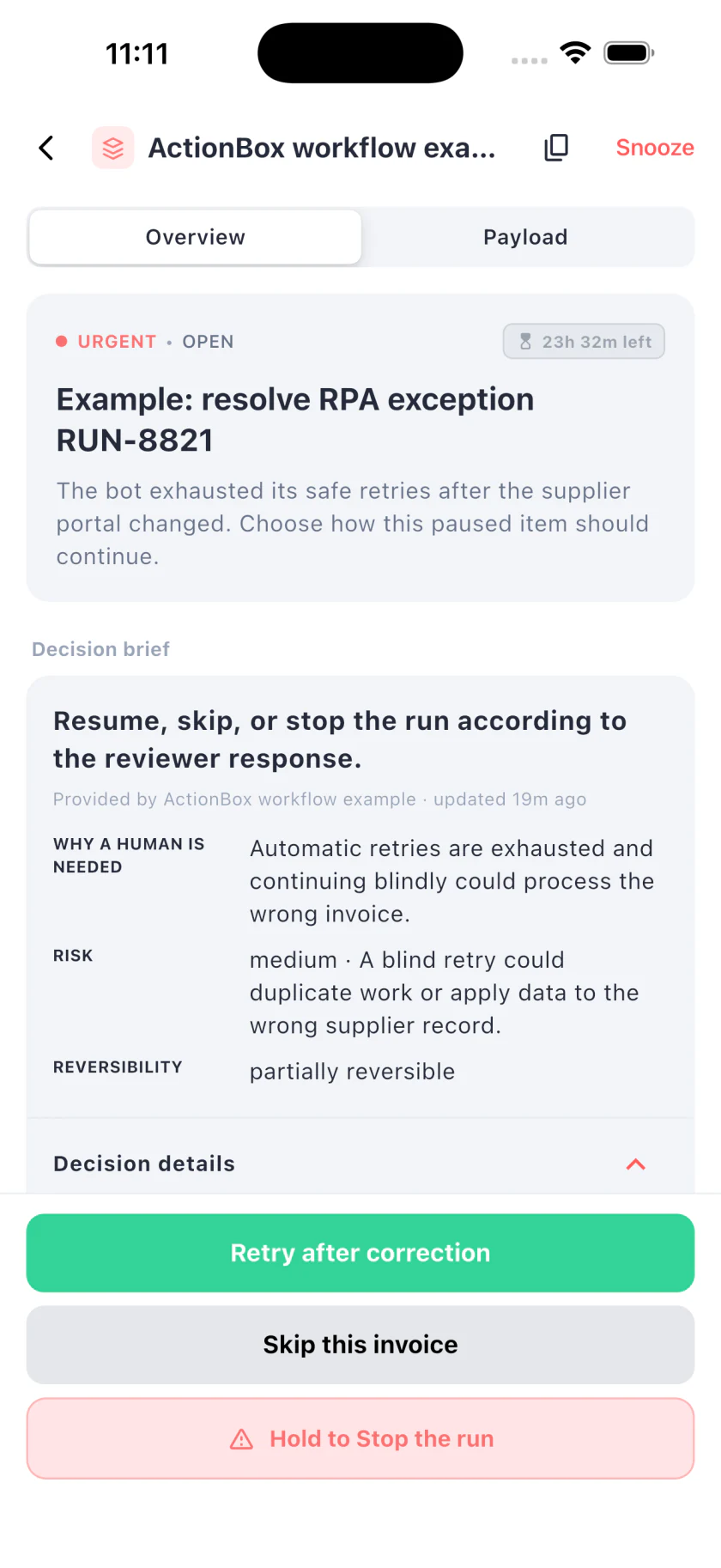
The operator sees why automation stopped, where the bot is paused, what a retry could affect, and which commands are available. The buttons return a response to the system that owns the bot; they do not operate the supplier portal directly.
API example for the automation team
This fictional invoice-entry request offers three choices: retry after correction, skip this invoice, or stop the run. The response values are commands the automation system understands.
curl -X POST https://api.actionbox.cloud/v1/actions \
  -H "Authorization: Bearer $ACTIONBOX_SOURCE_KEY" \
  -H "Content-Type: application/json" \
  -H "Idempotency-Key: rpa:run-8821:item-47:exception-1" \
  -d '{
    "title": "Resolve invoice bot exception RUN-8821",
    "description": "The bot exhausted its safe retries after the supplier portal changed. Choose how this paused item should continue.",
    "priority": "urgent",
    "interaction": {
      "type": "single_choice",
      "label": "Choose the recovery path",
      "options": [
        {"id": "retry", "label": "Retry after correction", "style": "primary"},
        {"id": "skip", "label": "Skip this invoice", "style": "default"},
        {"id": "stop", "label": "Stop the run", "style": "destructive"}
      ]
    },
    "decision_class": "rpa_runtime_exception",
    "decision_context": {
      "schema_version": 1,
      "reason": "Automatic retries are exhausted and continuing blindly could process the wrong invoice.",
      "current_state": "Run RUN-8821 is paused at item 47 of 120.",
      "proposed_change": "Resume, skip, or stop the run according to the reviewer response.",
      "expected_effect": "The bot orchestrator will continue from its saved checkpoint or end cleanly.",
      "risk_level": "medium",
      "risk_summary": "A blind retry could duplicate work or apply data to the wrong supplier record.",
      "reversibility": "partially_reversible",
      "rollback_plan": "Keep the item unposted until the downstream ledger confirms a single result.",
      "affected_scope": ["Run RUN-8821", "Invoice INV-77403", "Supplier portal"]
    },
    "context": [{
      "type": "key_value",
      "title": "Bot exception",
      "items": {
        "Step": "Open invoice detail",
        "Attempt": "3 of 3",
        "Error": "Expected field not found",
        "Checkpoint": "Item 47 of 120"
      }
    }],
    "callback_url": "https://bots.example.com/actionbox/callback",
    "metadata": {
      "run_id": "RUN-8821",
      "queue_item": "INV-77403",
      "checkpoint_version": 12
    }
  }'
If you add an expiry, it must be a future timestamp chosen for the workflow. If the create call is uncertain, retry with the same payload and idempotency key. Save the returned Action ID with the bot checkpoint.
Define each response before production
Each button needs a tested state transition:
Retry after correction
Use this when a person or separate maintenance process has fixed the condition. Before resuming, the orchestrator should confirm the checkpoint is current, inspect whether the target step already succeeded, and create a fresh session if the old one is no longer trustworthy.
Do not reset the whole run if the system can resume one item. A full replay increases duplicate risk and makes recovery slower.
Skip this invoice
Skipping should move the item to an explicit exception state with the reviewer, reason, and Action ID. The bot may continue with the next item only if items are independent and the queue policy permits it.
Do not quietly mark the invoice successful. Downstream reporting should be able to distinguish completed, skipped, quarantined, and failed work.
Stop the run
Stop at a safe boundary. Release leases, close sessions, preserve the queue cursor, and keep incomplete items available for a later run. If the bot coordinates with another worker, use the orchestrator's normal cancellation mechanism rather than killing a process and guessing what state it left behind.
Protect against stale responses
The bot owner may repair the selector or replace the queue item while the Action is open. Before using a response, compare the saved checkpoint version and the Action version or fingerprint with the current state.
If the run has moved on, cancel the old request or treat the response as stale. Do not apply “retry” to whichever job happens to occupy item 47 now.
ActionBox binds a response to the current Action snapshot. The surrounding orchestrator still needs its own run and item version checks.
Callbacks, polling, and recovery
A signed callback is useful when an unattended process should resume promptly. Verify the callback signature, deduplicate the event, load the checkpoint by Action ID, and read the authoritative Action if anything is unclear. The webhook guide describes the delivery contract.
Polling is reasonable for a short-lived worker when it uses bounded waits and persists the Action ID. Do not keep one fragile HTTP connection open for hours. For a broader design, see human-in-the-loop automation.
After the selected recovery command runs, report success or failure as the execution outcome. Keep the human response and machine result separate. “Retry” can be an authorized decision even when the next portal attempt fails again.
What to test
Build tests around the places where unattended automation usually loses state:
- The create request succeeds but the bot times out before saving the response.
- The same exception handler runs twice for one queue item.
- A portal submission succeeds but the response page does not load.
- The bot process restarts while the Action is open.
- A reviewer responds after the queue item changed.
- The callback is delivered more than once.
- The Action expires while the run remains paused.
- “Skip” is chosen for an item that the workflow is not allowed to skip.
The expected result is one Action per exception checkpoint, one downstream command, and an explicit state for every unresolved item.
Measures worth collecting
Avoid broad RPA accuracy claims unless you have a defined dataset and method. Exception rates vary with process stability, input quality, application design, and what the team counts as an exception.
Collect your own evidence instead:
- Exceptions per 1,000 queue items by bot and step
- Percentage recovered by bounded automatic retry
- Percentage routed to business review, maintenance, or quarantine
- Median time waiting for a reviewer
- Repeat exceptions after “retry after correction”
- Duplicate side effects, which should stay at zero
- Items skipped and later reprocessed
This data reveals where automation is brittle. It also gives you accurate material for a future case study without borrowing dramatic percentages from a weak citation chain.
Where ActionBox fits
Use your RPA platform's native human review when it already gives the right operators the context, response types, and recovery behavior you need. Use ActionBox when a custom bot runner or several automation systems need the same human decision inbox through a hosted API, web dashboard, and mobile app.
ActionBox does not run the bot, repair selectors, or decide whether an invoice is valid. It gives the paused workflow a durable place to ask, wait, and receive a typed answer.
The same exception boundary applies when a bot hands a transaction to another system. The EDI error handling guide shows how to separate technical retries from business exceptions.
References
- IBM RPA exception handling
- IBM guidance for unknown RPA exceptions
- UiPath Action Center introduction
Start with one non-production bot and one exception step. Prove that the run survives restart, duplicate callbacks, stale responses, and a failed recovery command before expanding the pattern.
Need help connecting a bot exception to ActionBox? Email info@actionbox.cloud with the RPA platform and exception you want to test.