

Most EDI errors should never reach a human. A transport timeout can retry. A malformed envelope can be rejected with a precise diagnostic. A duplicate interchange can be ignored or linked to the original. Human review belongs later, when a transaction is technically valid but the system cannot choose the correct business outcome.
A purchase order with a price mismatch is a good example. The X12 850 may pass transport, envelope, syntax, and mapping checks. The buyer's price still differs from the seller's catalog. Software can identify the variance, but accepting the price, requesting a correction, or rejecting the transaction is a commercial decision.
This guide shows how to classify failures, hold the business transaction, and send that decision to an authorized reviewer. ActionBox carries the review request and response. Your EDI platform, integration service, order system, and ERP continue to own message validation, acknowledgments, partner rules, and order creation.
Classify EDI errors by layer
The word “error” often hides several different problems. Start by recording the layer that failed:
| Layer | Example | Typical handling |
|---|---|---|
| Transport | SFTP unavailable, AS2 timeout, API connection failure | Retry with bounded backoff and delivery deduplication |
| Envelope or syntax | Invalid segment, missing control value, failed schema rule | Reject or quarantine with a machine-readable diagnostic |
| Mapping | Source qualifier has no target mapping | Correct mapping or master data, then reprocess the same message |
| Reference data | Unknown SKU, location, customer, or unit | Route to data stewardship or partner onboarding |
| Business rule | Price, quantity, date, credit, or policy mismatch | Ask an authorized business owner when policy cannot decide |
Cleo's current exception-management material follows a similar operational idea: detect and classify failures, preserve context, then guide resolution. The distinction matters because a generic retry queue treats a price dispute like a dropped network connection.
Retry technical failures, not business disagreement
Retries are appropriate when the operation is expected to succeed later without changing the request. They still need limits and identifiers.
For transport delivery, save the interchange ID, partner, destination, content hash, attempt count, and acknowledgment state. Before another send, check whether the receiver already accepted the interchange. A timeout can mean “the response was lost,” not “the message was never received.”
For a business exception, repeating the same valid purchase order does not resolve the mismatch. It creates noise and may create duplicates. Hold the translated transaction and ask for a disposition.
- Receive the message and verify who sent it.
- Check its envelope, structure, and required fields automatically.
- Translate the message and apply the trading-partner rules.
- Retry temporary delivery failures and quarantine malformed messages without waiting for a person.
- When the message is valid but breaks a business rule, hold the transaction and ask whether to accept, correct, or reject it.
Preserve the business transaction before review
Create an exception record in the system that owns the integration. It should include:
- Trading partner and agreement version
- Interchange and transaction set identifiers
- Document type, such as X12 850
- Business key, such as purchase order number
- The exact line or field that failed the rule
- Received and expected values, including unit and currency
- Original message hash and translated record version
- Current acknowledgment and order-creation state
Keep the raw EDI payload in the controlled integration store. Send the reviewer only the fields needed for the decision. This reduces data exposure and gives the business owner a focused question.
Try one EDI business exception
Pick one test purchase order with a harmless price or quantity mismatch. Agree with the business owner on the acceptable choices and what acknowledgement each choice requires. Create an ActionBox Source for the EDI workflow, send the sample request, and answer it on mobile. Confirm that the order remains on hold until the integration applies the chosen path.
What the reviewer sees on mobile
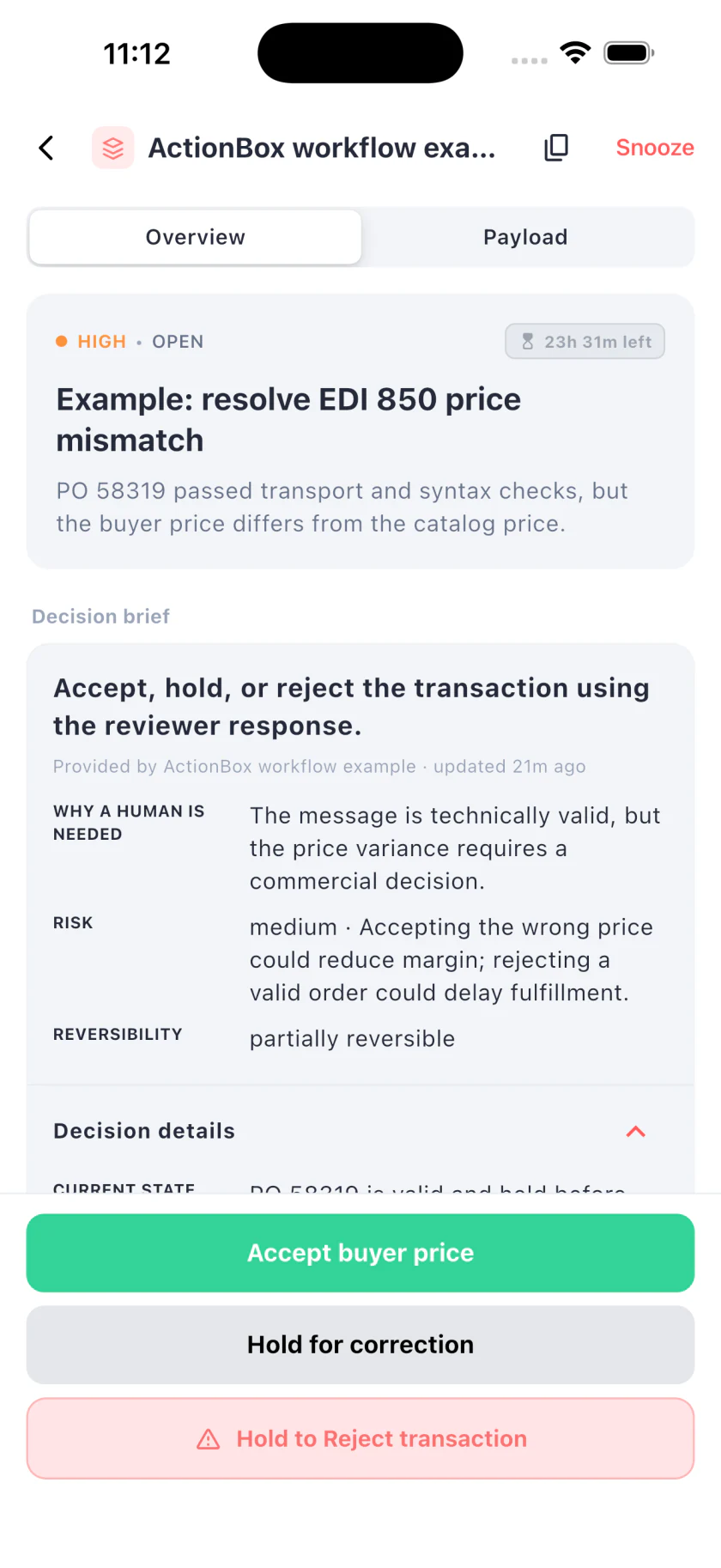
The mobile review makes the business question visible without exposing the entire interchange. The same Action is available in the web inbox. A button returns the chosen value to the integration; it does not generate an EDI acknowledgment or create an ERP order by itself.
API example for the integration team
This fictional request asks a reviewer what to do with line 4 of PO 58319. The response values map directly to integration commands.
curl -X POST https://api.actionbox.cloud/v1/actions \
  -H "Authorization: Bearer $ACTIONBOX_SOURCE_KEY" \
  -H "Content-Type: application/json" \
  -H "Idempotency-Key: edi:tp-104:po-58319:line-4:version-1" \
  -d '{
    "title": "Resolve EDI 850 price mismatch for PO 58319",
    "description": "The purchase order passed transport and syntax checks, but the buyer price differs from the catalog price.",
    "priority": "high",
    "interaction": {
      "type": "single_choice",
      "label": "Choose the business disposition",
      "options": [
        {"id": "accept", "label": "Accept buyer price", "style": "primary"},
        {"id": "hold", "label": "Hold for correction", "style": "default"},
        {"id": "reject", "label": "Reject transaction", "style": "destructive"}
      ]
    },
    "decision_class": "edi_business_exception",
    "decision_context": {
      "schema_version": 1,
      "reason": "The message is technically valid, but the price variance requires a commercial decision.",
      "current_state": "PO 58319 is valid and held before order creation.",
      "proposed_change": "Accept, hold, or reject the transaction using the reviewer response.",
      "expected_effect": "The EDI workflow will create the order, request correction, or send a rejection.",
      "risk_level": "medium",
      "risk_summary": "Accepting the wrong price could reduce margin; rejecting a valid order could delay fulfillment.",
      "reversibility": "partially_reversible",
      "rollback_plan": "Keep order creation idempotent and verify the ERP state before any retry.",
      "affected_scope": ["PO 58319", "Line 4", "Trading partner TP-104"]
    },
    "context": [{
      "type": "key_value",
      "title": "EDI exception",
      "items": {
        "Document": "X12 850",
        "Partner": "TP-104",
        "Line": 4,
        "Buyer price": "$42.00",
        "Catalog price": "$47.50"
      }
    }],
    "callback_url": "https://edi.example.com/actionbox/callback",
    "metadata": {
      "exception_id": "EDI-EX-2041",
      "po_number": "58319",
      "transaction_version": 1
    }
  }'
Use a stable idempotency key for this transaction version. Save the returned Action ID on the exception record. If the buyer sends a corrected order or the catalog changes, update the exception version and issue a review for the new snapshot rather than applying the old answer.
Map responses to explicit integration states
Avoid a single approved flag. It cannot tell the downstream system whether the reviewer accepted a price, accepted a quantity, authorized a substitution, or approved a delayed ship date.
For this example:
| Response | Exception state | Next integration step |
|---|---|---|
accept | Approved buyer price | Recheck the transaction version and create the order once |
hold | Awaiting correction | Keep order creation blocked and notify the responsible workflow |
reject | Rejected transaction | Record the reason and send the partner response defined by the agreement |
The partner agreement decides which acknowledgment, application advice, email, portal update, or other response is required. Do not infer that protocol behavior from an ActionBox option label.
Prevent duplicate orders when resuming
Order creation needs a business idempotency key, usually based on partner, document type, purchase order, and accepted revision. Before creating anything, query the ERP or order service for that key.
decision = read_action(saved_action_id)
exception = load_exception("EDI-EX-2041")

if decision is accept:
    require exception.transaction_version == 1
    require exception.order_id is empty
    order = create_order_once(
        key="TP-104:X12-850:58319:version-1",
        accepted_price="42.00 USD"
    )
    save order.id and close exception
If the ERP call times out, read by the same key before retrying. A duplicate Action and a duplicate order are separate risks. Protect both boundaries.
Handle changed messages and stale decisions
EDI transactions can change while a person is reviewing them. A corrected 850, catalog update, customer-service override, or manual ERP entry may remove the original exception.
Compare the current exception version with the one stored in Action metadata. Also verify the Action version and fingerprint. If the evidence changed, keep the old response from releasing the new transaction.
The safest recovery is often to close the old case and create a new Action that names the corrected version. Reviewers can then see why the previous request no longer applies.
Set deadlines from the business clock
An EDI exception may affect a promised ship date, warehouse cut-off, or partner service level. Use that clock to set priority and expiry. Do not make every exception urgent.
If the Action expires, leave the transaction in its defined hold or rejection path. Expiry should never imply “accept the buyer price.” The expiration and timeout guide covers terminal behavior and recovery.
Test an EDI exception workflow
Use synthetic messages and a non-production order receiver. Test at least these paths:
- A transport timeout retries and never creates a human Action.
- A malformed message is quarantined with a diagnostic.
- A valid price mismatch creates one Action.
- Accept creates one order with the reviewed price.
- Hold creates no order and leaves a visible exception state.
- Reject follows the partner-specific response path.
- A corrected transaction makes the old decision stale.
- Duplicate callbacks still produce one downstream result.
- Expiry leaves the order blocked.
For callback signature verification and deduplication, use the webhook approval integration guide.
Measures that improve the integration
Track EDI errors by layer instead of combining them in one failure count:
- Transport retries and final delivery failures
- Syntax rejections by rule and partner
- Mapping and reference-data exceptions
- Business exceptions by document, field, and partner
- Median time to disposition
- Percentage resolved by correction, acceptance, or rejection
- Transactions made stale before review completed
- Duplicate orders after recovery, which should remain zero
This shows whether the real problem is connectivity, partner data, a mapping gap, or a policy that creates too many manual decisions.
Where ActionBox fits
Use the exception workflow built into your EDI platform when it already provides the right decision experience and downstream controls. Add ActionBox when a custom integration, API gateway, transformation service, or cross-system order flow needs to route a business exception through the same web and mobile decision inbox used by other automations.
ActionBox does not parse EDI, validate X12 or EDIFACT, manage trading-partner agreements, or decide a commercial exception. It carries the human response back to the system that does.
If an RPA bot prepares or enters the transaction, the RPA exception handling guide covers checkpointing, bounded retries, and safe resume behavior.
References
- Cleo issue and error resolution
- Cleo Intelligent Exception Management overview
- ecosio guide to common EDI errors
Start with one business rule, such as a price variance above a defined threshold. Keep transport and syntax recovery automatic, and prove that every human response maps to one explicit integration state.
Need help designing the first EDI exception review? Email info@actionbox.cloud with the document type, business rule, and integration platform involved.