

An inventory adjustment changes the stock balance your systems use for allocation, replenishment, accounting, or fulfillment. A cycle count can reveal the difference, but the count alone should not authorize the write. Someone still needs to decide whether the evidence is reliable and whether the proposed adjustment is the right response.
That decision becomes more important when a custom warehouse tool, scanner workflow, or scheduled reconciliation job sits outside the approval features in your WMS or ERP. This guide shows how to hold the proposed change, collect a human response, and apply the adjustment without overwriting newer inventory activity.
ActionBox handles the review request. Your inventory system remains the authority for on-hand, available, reserved, damaged, and in-transit quantities.
What an inventory adjustment workflow should separate
Three events are easy to blur together:
- A person or device records a physical count.
- Software calculates a variance against a defined system snapshot.
- An authorized process applies an inventory adjustment.
Keep them as separate records. If the counter accidentally enters 19 instead of 119, you want to correct the count rather than post a 109-unit adjustment and reverse it later. If orders allocate stock after the count snapshot, you need to recalculate or reject a stale proposal rather than force the old number into the ledger.
Oracle's current Inventory Management documentation treats approval as its own task. Its physical inventory workflow lets users review discrepancies and approve or reject adjustments, while the broader task reference describes approval as the step that authorizes physical or financial changes. That separation is a sound model even when you are building the workflow around a custom system.
| Artifact | Minimum fields to preserve |
|---|---|
| Count observation | SKU, location, counter, timestamp, quantity, unit of measure |
| Comparison snapshot | System quantity, snapshot version or timestamp, reservations, known movements |
| Adjustment proposal | Delta, reason code, financial or availability impact |
| Approval | Reviewer, response, reviewed version, time, stated scope |
| Posting result | Inventory transaction ID, applied quantity, success or failure |
A cycle count variance workflow
- Record the physical count and confirm the item, bin, and unit.
- Compare it with a saved inventory snapshot.
- Apply your policy. A routine variance may close automatically; an exception stays on hold.
- Show the count evidence to a reviewer and ask whether to apply the exact proposal.
- Before posting, confirm that the stock record has not changed. If it has, recount or prepare a new proposal.
The threshold can use units, value, percentage, velocity, item class, or location risk. A nine-unit difference in low-value packaging may be routine. A one-unit difference in serialized or regulated stock may require investigation. Put that policy in the system that understands inventory, and send an Action only after it has classified the proposal.
Decide what may be automatic
Start with a narrow auto-adjust policy. For example, you may allow a verified count to post automatically when all of these conditions hold:
- The item is not serialized, lot-controlled, quarantined, or under investigation.
- The absolute quantity and value are within the configured threshold.
- A second count is not required by policy.
- No inventory movement occurred after the comparison snapshot.
- The reason code is allowed for automatic posting.
Everything else stays pending. The review should explain which rule caused the escalation. “Variance outside policy” is less useful than “9 units exceeds the 5-unit threshold for this item class.”
Try an inventory adjustment with sample stock
Use an item and bin that exist only in a test system. Write down the book quantity, physical count, reason for the difference, and who may authorize the change. Create an ActionBox Source for cycle count reviews, send the example request, and answer it on mobile. The test is successful only when the inventory system either posts the exact approved change once or leaves the stock untouched.
What the reviewer sees on mobile
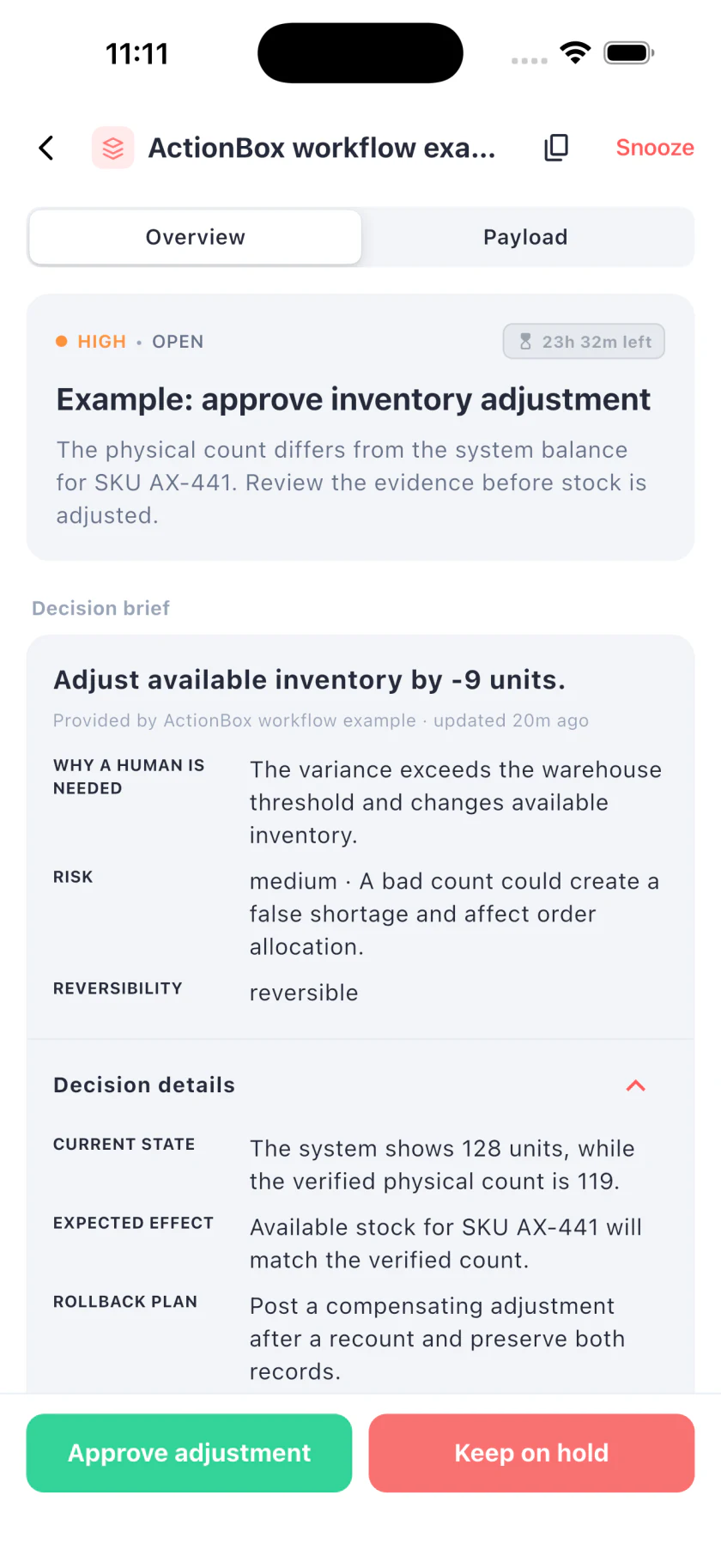
The reviewer can compare the proposal, reason, risk, and recovery plan without losing the response controls. The web inbox presents the same Action. Neither surface posts stock directly; the inventory integration receives the response and performs the guarded write.
API example for the integration team
This fictional request asks whether to reduce a bin balance from 128 to 119 units. A yes-or-no response works because the downstream system has only two safe states: apply this exact proposal or keep it on hold.
curl -X POST https://api.actionbox.cloud/v1/actions \
  -H "Authorization: Bearer $ACTIONBOX_SOURCE_KEY" \
  -H "Content-Type: application/json" \
  -H "Idempotency-Key: inventory-count:cc-8841:proposal-2" \
  -d '{
    "title": "Approve inventory adjustment for cycle count variance",
    "description": "The physical count differs from the system balance for SKU AX-441. Review the evidence before stock is adjusted.",
    "priority": "high",
    "interaction": {
      "type": "boolean",
      "label": "Apply the proposed inventory adjustment?",
      "true_label": "Approve adjustment",
      "false_label": "Keep on hold"
    },
    "decision_class": "inventory_adjustment",
    "decision_context": {
      "schema_version": 1,
      "reason": "The variance exceeds the warehouse threshold and changes available inventory.",
      "current_state": "The system shows 128 units, while the verified physical count is 119.",
      "proposed_change": "Adjust available inventory by -9 units.",
      "expected_effect": "Available stock for SKU AX-441 will match the verified count.",
      "risk_level": "medium",
      "risk_summary": "A bad count could create a false shortage and affect order allocation.",
      "reversibility": "reversible",
      "rollback_plan": "Post a compensating adjustment after a recount and preserve both records.",
      "affected_scope": ["SKU AX-441", "Bin B-17", "9 units"]
    },
    "context": [{
      "type": "key_value",
      "title": "Count evidence",
      "items": {
        "Warehouse": "US-East",
        "Bin": "B-17",
        "System quantity": 128,
        "Counted quantity": 119,
        "Variance": "-9 units"
      }
    }],
    "callback_url": "https://inventory.example.com/actionbox/callback",
    "metadata": {
      "count_id": "CC-8841",
      "sku": "AX-441",
      "inventory_version": 91427
    }
  }'
The idempotency key identifies this proposal version. If a recount changes 119 to 121, create a new proposal version and a new key. Do not reuse an approval for a different quantity.
Store the returned Action ID beside the count record. The idempotency guide covers safe retries when the caller cannot tell whether the first create request succeeded.
Recheck the snapshot before posting
An approval can be valid when it is given and stale a second later. Inventory moves quickly. Pickers, receipts, returns, reservations, and transfers can all change the quantities used to calculate the proposal.
Before posting, use optimistic concurrency or another version check supported by the inventory system:
if action.response is approved:
    current = inventory.read(sku="AX-441", bin="B-17")

    if current.version != metadata.inventory_version:
        mark proposal stale
        cancel or replace the open review
        recount or recalculate
    else:
        inventory.adjust_once(
            request_id="CC-8841:proposal-2",
            delta=-9,
            reason="cycle_count_variance"
        )
The adjustment request needs its own idempotency key. ActionBox prevents duplicate review requests when you retry correctly. Your WMS or ERP must prevent the approved adjustment from posting twice.
If the inventory write succeeds and the outcome report times out, read the inventory transaction by its request ID before retrying. A second -9 adjustment is not a harmless duplicate.
Reasons to keep the proposal on hold
“Keep on hold” should lead somewhere useful. Route it to a recount, supervisor review, damage inspection, reservation check, or transaction investigation. Preserve the reason in the inventory case record if your process requires one.
Common signals include:
| Signal | Next check |
|---|---|
| Large absolute or value variance | Independent recount and movement review |
| Serialized item mismatch | Reconcile serial records, not just total quantity |
| Recent receiving activity | Verify receipt completion and put-away location |
| Negative available inventory | Check reservations, backorders, and unit conversion |
| Repeated variance in one bin | Investigate location labeling, access, and process errors |
An approval workflow should not hide a weak count process. Repeated manual adjustments are evidence that something upstream needs attention.
Expiry and reminders
Give the Action a deadline that matches the operational consequence. An urgent fulfillment bin may need review within minutes. A slow-moving reserve location may tolerate a longer window.
When the Action expires, keep the proposal unapplied. The expiration is a terminal result for the request, not permission to choose a default. Use the expiration and timeout guide to decide how the integration should recover.
Mobile notifications can help the reviewer see an assigned Action, but notification delivery is not workflow state. The integration should read the Action or process a verified callback before changing inventory.
Test the workflow with synthetic stock
Build a small fixture with an item, a bin, a snapshot version, and a count. Then run these cases:
- Approve the exact proposal and confirm one inventory transaction posts.
- Keep it on hold and confirm no quantity changes.
- Change the inventory version before approval and confirm the old proposal cannot post.
- Retry the create request and confirm one Action exists.
- Deliver the callback twice and confirm one adjustment exists.
- Let the Action expire and confirm the stock remains unchanged.
- Simulate a successful inventory write followed by a network timeout and confirm recovery reads before retrying.
This is the same discipline used in data reconciliation: detect the discrepancy, preserve the evidence, and separate investigation from mutation.
Measures that reveal whether the workflow helps
Track a small set of process measures before making public claims:
- Count proposals by location and item class
- Approval time by priority and shift
- Recount rate after a proposal is held
- Stale proposals caused by later inventory movement
- Adjustments posted more than once, which should remain zero
- Repeat variances for the same SKU and bin
- Total and absolute value of approved adjustments
These measures can produce original content later. A useful case study explains the policy, sample size, period, and denominator rather than advertising an unexplained percentage.
Where ActionBox fits
Use the native WMS or ERP approval when it already meets the need. ActionBox is useful when the count originates in a custom scanner app, data job, integration service, or warehouse automation that needs to ask a person outside its own interface.
Create a Source for that integration, send only the context the reviewer needs, and let the inventory system keep control of quantity, valuation, reservations, and posting.
When a count variance begins with damaged or nonconforming material, the material review board process should determine the disposition before the inventory transaction is proposed.
References
- Oracle: review and approve physical inventory adjustments
- Oracle: inventory management tasks
- ShipStream 2026.1 inventory adjustment validation
Start with one non-production cycle count and prove that approve, hold, expiry, stale version, and duplicate delivery all preserve the intended stock balance.
Need help setting up the first cycle count review? Email info@actionbox.cloud with the inventory system and adjustment process you use today.