

A price override lets an authorized person approve a price outside the seller's normal limit. The workflow sounds simple until a custom quote service, marketplace, internal ordering tool, or field-sales app has to enforce it consistently.
The system needs to know which requests can pass automatically, who may review an exception, which quote version they saw, and whether the approved price was actually published. A message that says “18% discount approved” is not enough if the quantity, term, currency, or list price changed while the reviewer was reading it.
This guide builds the approval around one immutable proposal. ActionBox carries the question and typed response. Your quoting, commerce, or pricing service remains responsible for policy, price calculation, margin, tax, contract terms, and quote release.
What is a price override?
A price override replaces or discounts the price produced by the normal pricing rules. It may apply to one line, an entire quote, a customer segment, a store transaction, or a contract term.
Microsoft Dynamics 365 Commerce documents a threshold-based pattern: when an override exceeds the configured limit, the request enters a predefined workflow for review and approval. That is a useful baseline for custom systems. Routine requests stay fast, while material exceptions receive accountable review.
A price override workflow should answer these questions before it asks anyone to click:
- Which rule or limit did the request exceed?
- Is the override a percentage, fixed amount, or replacement unit price?
- Which lines, quantities, currency, and contract period are in scope?
- What list, floor, and proposed prices did the calculation use?
- What is the expected margin or other business impact?
- Who is allowed to decide at this level?
- When does the proposal expire?
Build the policy before the approval screen
The pricing service should classify the request first. A simple policy may consider discount percentage and expected gross margin. A mature policy may also consider customer tier, product family, quantity, sales channel, contract length, promotion conflicts, and whether the request can be reversed after acceptance.
Write the rule as data or code that can be tested. For example:
| Request | Example handling |
|---|---|
| Discount within seller limit and margin floor | Continue automatically |
| Discount above seller limit but within manager authority | Route to manager review |
| Margin below protected floor | Route to a higher authority or reject by policy |
| Quote data incomplete or stale | Return for correction before review |
| Proposal expired | Reprice and create a new request |
Do not ask a reviewer to compensate for missing calculations. If the system cannot state the list price, proposed price, quantity, currency, and quote version, it is not ready for approval.
The price override workflow
- Calculate the quote from the current price list and discount rules.
- Let requests within the seller's authority continue normally.
- Freeze the quote version when a larger override needs approval.
- Show the reviewer the proposed price, discount, margin context, and reason.
- Before publishing, confirm that the quote and policy have not changed. A changed quote needs a new review.
The quote should remain unpublished while the Action is open. A timeout, missed push notification, or callback error is not approval.
Try one price override with a sample quote
Create a fictional customer and quote in a test system. Set one simple rule, such as manager review above a 12% discount, and define who may answer. Create an ActionBox Source for quote reviews, send the sample request, and respond on mobile. Confirm that approval releases only the version shown to the reviewer.
What the approver sees on mobile
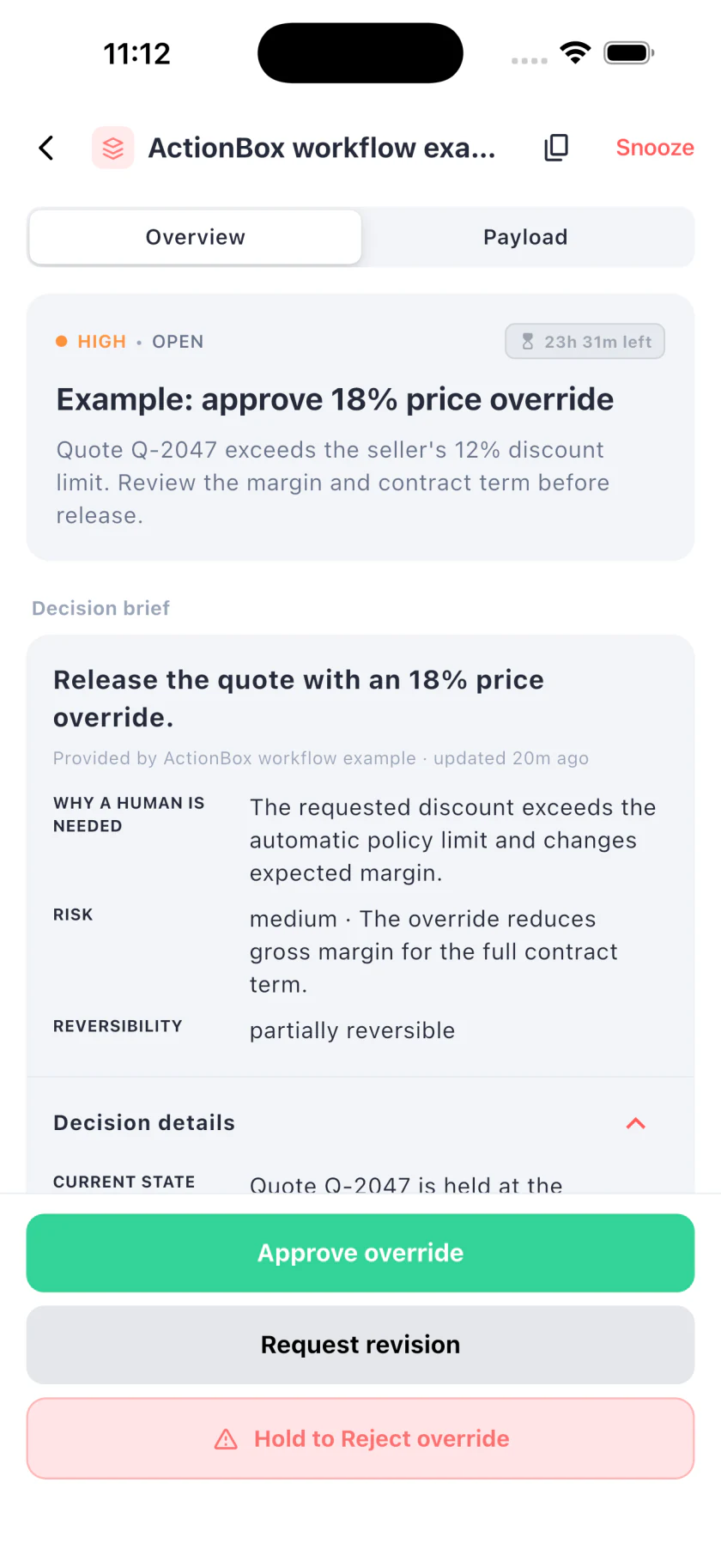
The reviewer sees the proposal, the reason for escalation, risk, reversibility, and allowed responses. The buttons stay available while the detailed context scrolls. The web inbox shows the same Action. This is a fictional quote, not a customer result.
API example for the integration team
This synthetic request routes an 18% discount because the seller's automatic limit is 12%. It offers three responses: approve the exact proposal, request a revision, or reject it.
curl -X POST https://api.actionbox.cloud/v1/actions \
  -H "Authorization: Bearer $ACTIONBOX_SOURCE_KEY" \
  -H "Content-Type: application/json" \
  -H "Idempotency-Key: quote:q-2047:version-6:override-18" \
  -d '{
    "title": "Approve 18% price override for quote Q-2047",
    "description": "The requested discount exceeds the seller limit. Review the margin and contract term before the quote is released.",
    "priority": "high",
    "interaction": {
      "type": "single_choice",
      "label": "Choose the quote decision",
      "options": [
        {"id": "approve", "label": "Approve override", "style": "primary"},
        {"id": "revise", "label": "Request revision", "style": "default"},
        {"id": "reject", "label": "Reject override", "style": "destructive"}
      ]
    },
    "decision_class": "price_override",
    "decision_context": {
      "schema_version": 1,
      "reason": "The requested discount exceeds the automatic policy limit and changes expected margin.",
      "current_state": "Quote Q-2047 is held at the standard 12% seller limit.",
      "proposed_change": "Release the quote with an 18% price override.",
      "expected_effect": "The quoting service will publish the approved price to the customer.",
      "risk_level": "medium",
      "risk_summary": "The override reduces gross margin for the full contract term.",
      "reversibility": "partially_reversible",
      "rollback_plan": "Do not publish the quote until the decision matches the current quote version.",
      "affected_scope": ["Quote Q-2047", "12-month term", "Enterprise plan"]
    },
    "context": [{
      "type": "metrics",
      "title": "Commercial impact",
      "items": [
        {"label": "List price", "value": 48000, "unit": "USD"},
        {"label": "Proposed price", "value": 39360, "unit": "USD"},
        {"label": "Gross margin", "value": 54, "unit": "%"}
      ]
    }],
    "callback_url": "https://quotes.example.com/actionbox/callback",
    "metadata": {
      "quote_id": "Q-2047",
      "quote_version": 6,
      "pricing_policy_version": "2026-09-01"
    }
  }'
Set a future expiry that matches the quote's validity window. Store the returned Action ID with quote version 6, and retry an uncertain create call with the same payload and idempotency key.
Treat approval as a versioned capability
An approval authorizes one proposal. It should not become a reusable flag on the customer or quote.
Before releasing the quote, compare:
- Quote ID and version
- Pricing policy version
- Currency and price basis
- Included products, quantities, and term
- List and proposed prices
- Action version and fingerprint
- Reviewer authority required by your policy
If any decision-relevant field changed, recalculate and request a new approval. A higher quantity at the same percentage may have a different margin impact. A currency change can make the displayed amounts meaningless. A contract term change can extend the cost of the concession.
ActionBox protects the response against a changed Action snapshot. The quoting system must protect its own proposal version.
Define what each response does
Approve override
Recheck the quote and policy versions, confirm the reviewer is allowed to approve this tier, and publish the exact proposal once. Save the Action ID and response with the released quote.
Request revision
Return the quote to an editable state and explain what information the seller needs to change. The revised quote becomes a new version. If it still exceeds policy, create a new Action for that version.
Do not reuse the previous approval request after the proposed price changes.
Reject override
Close the request and leave the standard price or allowed limit in place. Preserve the rejection as part of the quote's history. Whether the seller may submit a different proposal is a pricing-policy decision.
Publish the quote idempotently
The response callback may be retried. Your handler may also crash after publishing the quote but before saving its local result. Use a downstream key such as Q-2047:version-6:publish and read before retrying.
action = verify_and_read(saved_action_id)
quote = load_quote("Q-2047")

if action.response == "approve":
    require quote.version == 6
    require quote.status == "awaiting_override_approval"
    publish_quote_once(
        key="Q-2047:version-6:publish",
        price="39360.00 USD"
    )
The Action idempotency key prevents duplicate human requests. The publish key prevents duplicate quote release. Keep both.
After publishing, report a successful execution outcome. If publication fails, report failure without rewriting the human response. Approval and execution are separate facts.
Expiry, reassignment, and mobile review
Tie expiry to the quote's commercial validity. When a proposal expires, reprice it before requesting another decision. Do not use a response from an expired or superseded request.
Assign high-value requests to the person who owns that pricing tier. A shared inbox can provide coverage, but reviewer authority still comes from your business policy. ActionBox records the response; it does not invent pricing authority.
The mobile app guide covers mobile review. Notification delivery helps a person notice the Action, but your quote service should rely on the Action state or a verified callback.
Test before connecting a live quote
Use a fake customer and a non-production quote publisher. Test:
- A request within the seller limit continues without an Action.
- An 18% request creates one Action for one quote version.
- Approve publishes the exact reviewed price once.
- Request revision publishes nothing and creates an editable next version.
- Reject publishes nothing.
- A quantity or price change makes the old response stale.
- Duplicate callbacks still produce one publication.
- Expiry forces repricing.
- A publish timeout recovers by reading the downstream result before retrying.
Measures for improving the policy
Collect process data with defined denominators:
- Override requests per 100 quotes
- Requests by discount band, product family, and seller role
- Approval, revision, rejection, and expiry rates
- Median review time by tier
- Percentage of approved quotes that customers accept
- Margin difference between requested and final quotes
- Stale decisions caused by quote changes
- Duplicate publications, which should remain zero
This can show whether a threshold is too strict, sellers lack clear guidance, or one product requires a better pricing rule. It can also support a future evidence-based article once the sample period and definitions are stable.
Where ActionBox fits
Use the price-override workflow built into your commerce or CRM platform when it already fits your process. ActionBox is useful for custom quote services, internal tools, marketplaces, and cross-system sales workflows that need a typed human decision through a hosted API and shared web or mobile inbox.
ActionBox does not calculate price, guarantee margin, authorize a role, or publish the quote. It provides the decision handoff your integration can verify before acting.
For stock changes that need the same version and idempotency controls, see the inventory adjustment approval workflow.
References
Start with one discount tier and a synthetic quote. Make the proposal version, price basis, authority check, expiry, and publish idempotency visible before routing real requests.
Need help setting up a price override review? Email info@actionbox.cloud with the quoting or commerce system you want to connect.